Overview
While building my self-hosted Hugo publishing workflow, I got a useful reminder:
Even if your deployment looks simple, it often relies on more than one network flow.
This came up while I was tightening firewall rules around the DMZ web server that hosts the Hugo site. The first part of this post describes the setup as it was in early 2026. The dated updates further down cover how the setup changed since then. Host names, addresses and commands are anonymised or simplified examples.
The Setup (High Level, at the Time)
The environment looked roughly like this:
- A trusted workstation where I wrote content
- An internal Git server (Gitea) on the LAN
- A public-facing web server in a DMZ
- A deployment script that pulled updates and rebuilt the Hugo site
The publishing workflow was:
- Edit content locally
- Commit and push to Git
- Trigger a deploy command remotely over SSH
- The web server pulls the latest content and rebuilds the site
Network Flow Overview
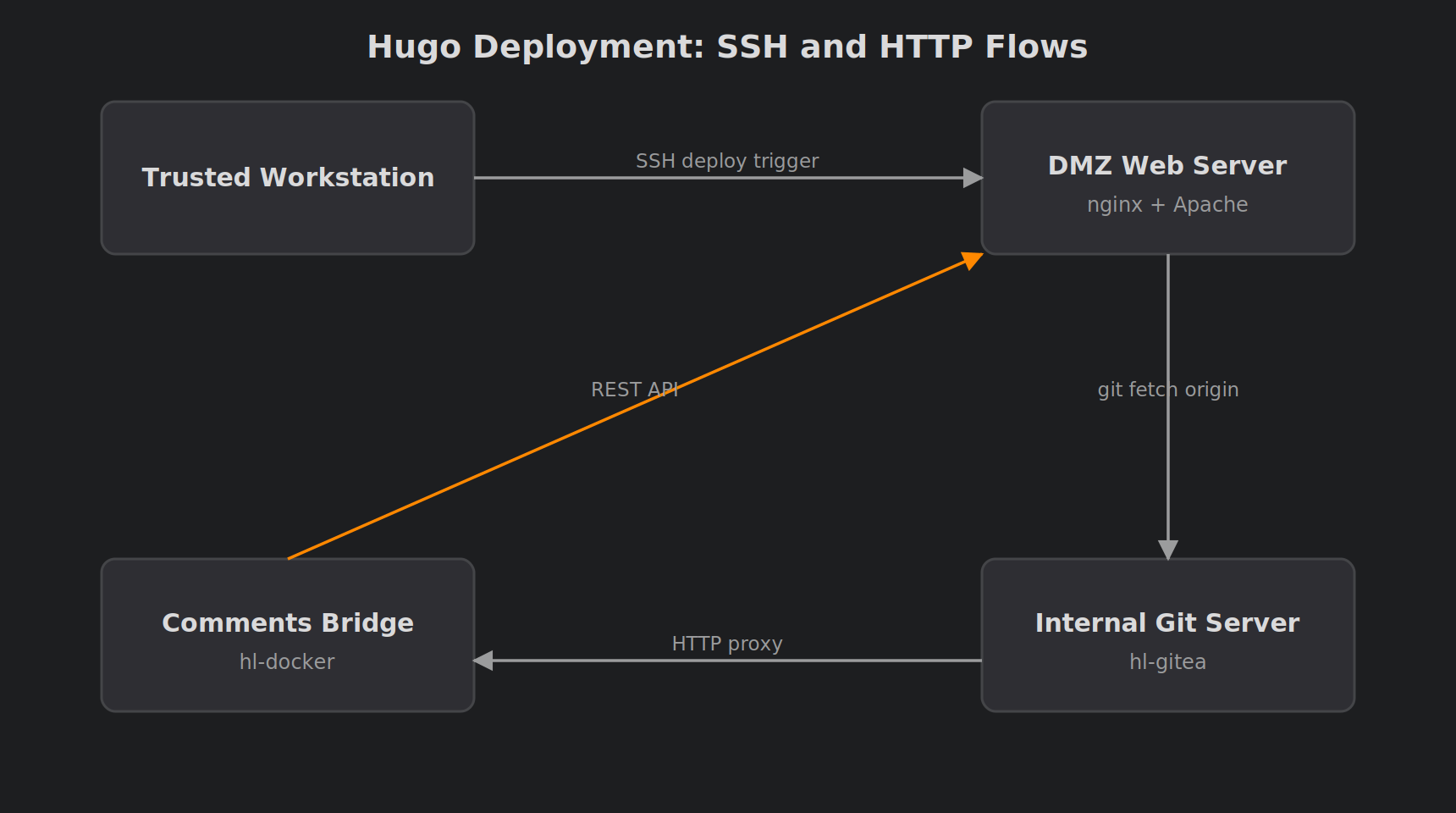
At the time, the deployment pipeline relied on two separate SSH connections:
- Workstation → DMZ web server, to trigger the deployment script.
- DMZ web server → internal Git server, so the script could fetch the latest content.
Only these two SSH paths were needed for publishing.
Figure: SSH flows in the original deployment pipeline (since retired, see the updates below).
The Problem: SSH Deployment Broke After Firewall Lockdown
Once everything was running smoothly, I decided to lock down SSH access to the DMZ host. I created a firewall rule that allowed SSH from the workstation to the DMZ web server on port 22.
That looked right. Then my deploy script failed.
As a test, I temporarily opened all ports, and everything worked again. That told me straight away:
Another network dependency was being blocked.
The Key Realisation: Deployment Required Two SSH Flows
I was only SSH’ing into the web server, but the web server itself also needed outbound access. There were actually two separate SSH connections involved.
1. Workstation → Web Server (Remote Trigger)
This was the obvious one. It looked something like this:
| |
Firewall requirement: allow SSH from the trusted workstation to the DMZ host.
2. Web Server → Git Server (Pull Latest Content)
Inside the deploy script, the DMZ server ran something like this:
| |
So the DMZ host also had to be able to reach the Git server over SSH.
Firewall requirement: allow SSH from the DMZ host to the internal Git server.
The Fix: Minimal Rules, Maximum Security
Once I understood the full workflow, the firewall rules became very clean.
Rule A: trusted clients → DMZ web server
- Source: the trusted clients network
- Destination: the web server
- Port: 22
Rule B: DMZ web server → internal Git server
- Source: the web server
- Destination: the Git server
- Port: 22, for Git pulls only
Quick Connectivity Test
A useful test to run from the DMZ host, for example:
| |
If that fails, the host can’t fetch updates.
Final Result
With both rules in place, I ended up with:
- SSH into the DMZ host restricted to trusted machines
- No unnecessary lateral movement between VLANs
- A working automated deployment pipeline
- Only the minimum required ports open
That held for a while. The updates below show that “minimum required” kept changing as the site grew, and that the biggest improvement came from removing a flow, not from tightening one.
Update: A Third Flow, Outside SSH Entirely
After I added a self-hosted comment system to the site, the picture above turned out to be incomplete. Neither SSH rule was wrong. The problem was that the comments feature depends on a flow that isn’t SSH at all.
The DMZ web server proxies comment requests to a small internal bridge service. The bridge then talks to the Git server’s REST API over HTTPS. Neither leg uses SSH. This kind of dependency is easy to miss when you’re specifically auditing “what needs SSH?”, because a firewall review scoped to port 22 will never surface it.
Firewall requirement (non-SSH):
- DMZ web server → comments bridge, on the bridge’s HTTP port
- Comments bridge → internal Git server, on the Git server’s HTTPS port
The lesson applies beyond SSH. When you lock down a DMZ host, map every outbound dependency the app stack has, not just the protocol you happen to be auditing.
Update: A Fourth Flow, and This One Points Outwards
At the end of September 2026 I moved the public site behind a Cloudflare Tunnel. The DMZ web server now runs cloudflared, which dials out to Cloudflare, and visitors’ requests come back down that connection. The router’s inbound web port-forward is gone, so nothing on the internet can reach the web server directly any more.
Same lesson, new direction. The firewall now has to allow the DMZ host’s outbound tunnel connection, and nothing inbound for the web at all.
Two side effects caught me out:
Every visitor looked like localhost. Requests arrive from
cloudflaredon the same box, so the web server has to trust the real client address that Cloudflare passes along. In nginx, a minimal version looks like this:1 2 3set_real_ip_from 127.0.0.1; set_real_ip_from ::1; real_ip_header CF-Connecting-IP;Firewall-based banning stopped working. When fail2ban blocks by source IP at the firewall, it achieves nothing if all traffic comes from localhost. Bans now happen inside the web server instead, using a map of banned addresses that returns 403.
Update: The Deploy Trigger Is Gone
In October 2026 I retired the old deploy script, and with it the “workstation SSHs into the DMZ to publish” flow that started this whole post.
Publishing now works the other way round. I approve posts in my LAN-only home-lab console, and the console commits them to the internal Git server. The DMZ host doesn’t wait to be told anything. It pulls from the Git server and rebuilds the site on a short timer. The details are in Automating Hugo Deployments.
The pull side is just a timer-driven script. A simplified example:
| |
What this changed on the firewall:
- Rule A is no longer part of publishing. Inbound SSH to the DMZ host remains only for occasional administration from trusted machines. It’s still tightly scoped, but nothing breaks if I close it for a week.
- Every flow that publishing needs now starts in the DMZ host or stays inside the LAN. The DMZ host pulls from Git, and the console pushes to Git. No internal machine has to initiate a connection into the DMZ to get a post live.
- There’s no remote command execution path for deploys. Previously, a credential that could SSH into the DMZ host and run the deploy script was sitting on my workstation. Now there’s nothing to trigger, so that credential doesn’t exist.
The trade-off is a small delay: a post goes live within one timer interval instead of instantly. For a personal blog that’s an easy price to pay.
Takeaway
When hardening infrastructure, always map the full flow:
- Who connects to the server?
- What does the server need to connect to?
- Which of those connections does it actually need?
The original lesson still stands: deployment wasn’t just “SSH in”, it was also “Git pull out”. But the bigger lesson came later:
The best firewall rule is the one you no longer need.
Tightening Rule A made publishing safer. Redesigning the pipeline so the DMZ host pulls on its own made Rule A irrelevant to publishing. If a DMZ host can fetch what it needs by itself, don’t give the inside of your network a reason to reach into it.
If you’re interested in the rest of the pipeline, see the deployment automation write-up and the Git-backed comment system using a private Gitea backend.
Comments