Update (October 2026): I no longer relay through an external provider. My mail is now self-hosted, and the LAN relay for scripts and alerts is part of that mail server (recipient-restricted, with STARTTLS). This guide is still a valid pattern if you send through a provider’s smart host, so I’ve left it up.
Overview
This article documents a practical pattern for reliable outbound mail in a small network:
- A dedicated mail relay host (
mail-relay) running Postfix - Workstations using
msmtp(viamsmtp-mta) as a lightweight sendmail-compatible client - Postfix relays mail to an upstream provider (a “smart host”) using SASL authentication and (typically) STARTTLS
All hostnames, IP addresses, and email addresses are anonymised. Replace placeholders like:
mail-relay.lan(mail relay host)mail.example.com(upstream SMTP provider / smart host)[email protected](mailbox)192.168.x.x(LAN IPs)
Architecture
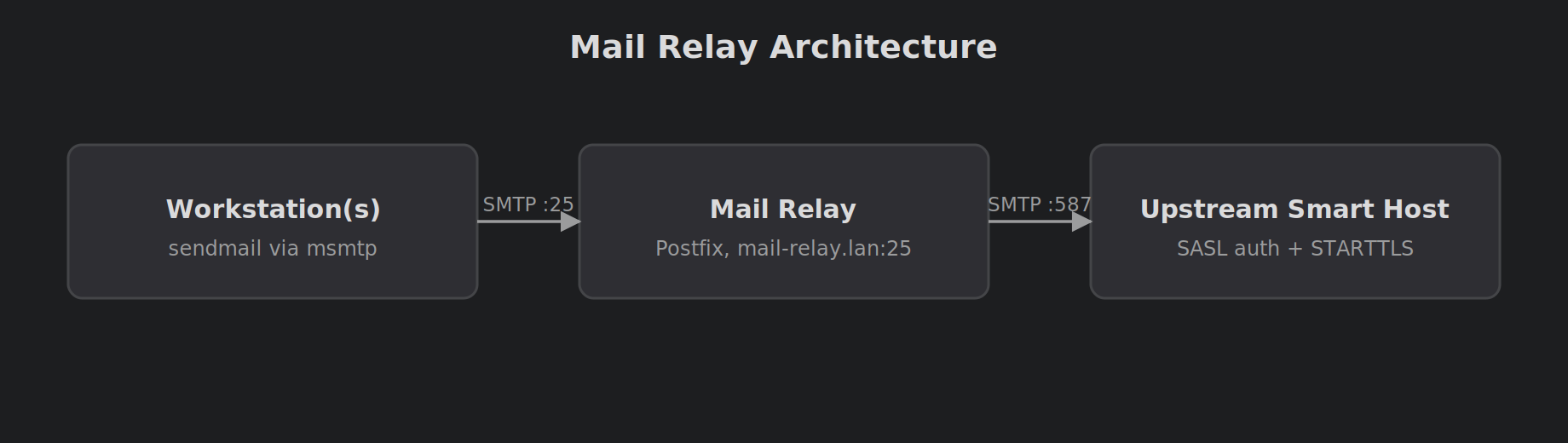
Workstation(s)
sendmail → msmtp → SMTP to mail-relay.lan:25
Mail relay (mail-relay)
Postfix receives mail from LAN → relays upstream to mail.example.com:587 (or 465, depending on provider)
Part 1: Build the Mail Relay (mail-relay) with Postfix
Install Postfix
On mail-relay:
| |
During install, choose “Internet Site” or “Satellite system” depending on preference. We’ll explicitly configure next.
Set a stable hostname
| |
Make sure DNS or /etc/hosts resolves mail-relay.lan correctly on your LAN.
Postfix configuration
Postfix’s main config is:
/etc/postfix/main.cf
Recommended main.cf baseline (relay host)
| |
SASL credentials file
Create /etc/postfix/sasl_passwd:
| |
Add:
| |
Secure it and build the hash DB:
| |
Reload Postfix:
| |
Confirm Postfix is listening on port 25 (LAN)
| |
You should see master / smtpd bound to 0.0.0.0:25 (or your LAN interface).
Testing relayhost connectivity
From mail-relay:
| |
If you can’t reach your provider, fix firewall/DNS first.
Common Postfix queue troubleshooting
Check the queue:
| |
Flush the queue (retry delivery):
| |
Watch logs:
| |
Typical failure: SASL authentication failed (535)
A classic symptom looks like:
| |
Fixes usually are:
- Wrong username (typo)
- Wrong password (use an app password if your provider requires it)
- Wrong port / TLS mode (587 STARTTLS vs 465 implicit TLS)
Part 2: Configure Workstations with msmtp (sendmail-compatible)
The workstation goal is simple:
- Apps/scripts write to
sendmail sendmailis provided bymsmtp-mta- msmtp forwards mail to
mail-relay.lan:25
Install msmtp
On each workstation:
| |
Confirm sendmail exists:
| |
It should report msmtp version ....
Per-user config: ~/.msmtprc
Create:
| |
Example config (LAN relay, no auth, no TLS on LAN):
| |
Test:
| |
Or:
| |
File permissions gotchas (msmtp logging)
If you see:
| |
Use a per-user logfile (recommended):
| |
Or remove logging if you prefer.
System-wide config: /etc/msmtprc (optional)
If you want a single config for all users, use /etc/msmtprc. For LAN relay with no auth, it’s safe:
| |
Debugging “mail never arrived” cases
1) Confirm workstation can reach mail-relay port 25
| |
2) Use msmtp debug to see SMTP dialogue
| |
3) Check Postfix logs on mail-relay
| |
SMTP size limits (552 “message file too big”)
If you hit:
| |
You’re exceeding the upstream provider’s message size limit.
Fixes:
- Email a summary + last N lines
- Store full logs locally
- (Optional) compress and attach (still counts toward size)
Recommended pattern for scripts
Generate a short report and pipe to sendmail:
| |
Security Notes
- Keep
mynetworkstight (only your LAN ranges) - Prefer app-passwords for upstream auth
- Use STARTTLS upstream (
smtp_tls_security_level=encrypt) - Don’t expose unauthenticated port 25 to the internet
Wrap-up
With Postfix as a local smart host and msmtp on workstations, you get:
- Reliable outbound delivery
- “sendmail” compatibility for scripts and tooling
- Centralised relay configuration
- Easier troubleshooting (single mail-log source)
Next steps could include SPF/DKIM/DMARC (if sending as your own domain) and alerting on repeated delivery failures.
Comments