Overview
MagicMirror² is an open-source smart display platform built on Node.js. It puts a screen on the wall that shows the things you want to glance at, such as weather, news and the state of the house, in a clean, always-on layout.
Mine sits on a stand in my office in Queenstown, NZ. Since October 2026 it has rotated through three pages:
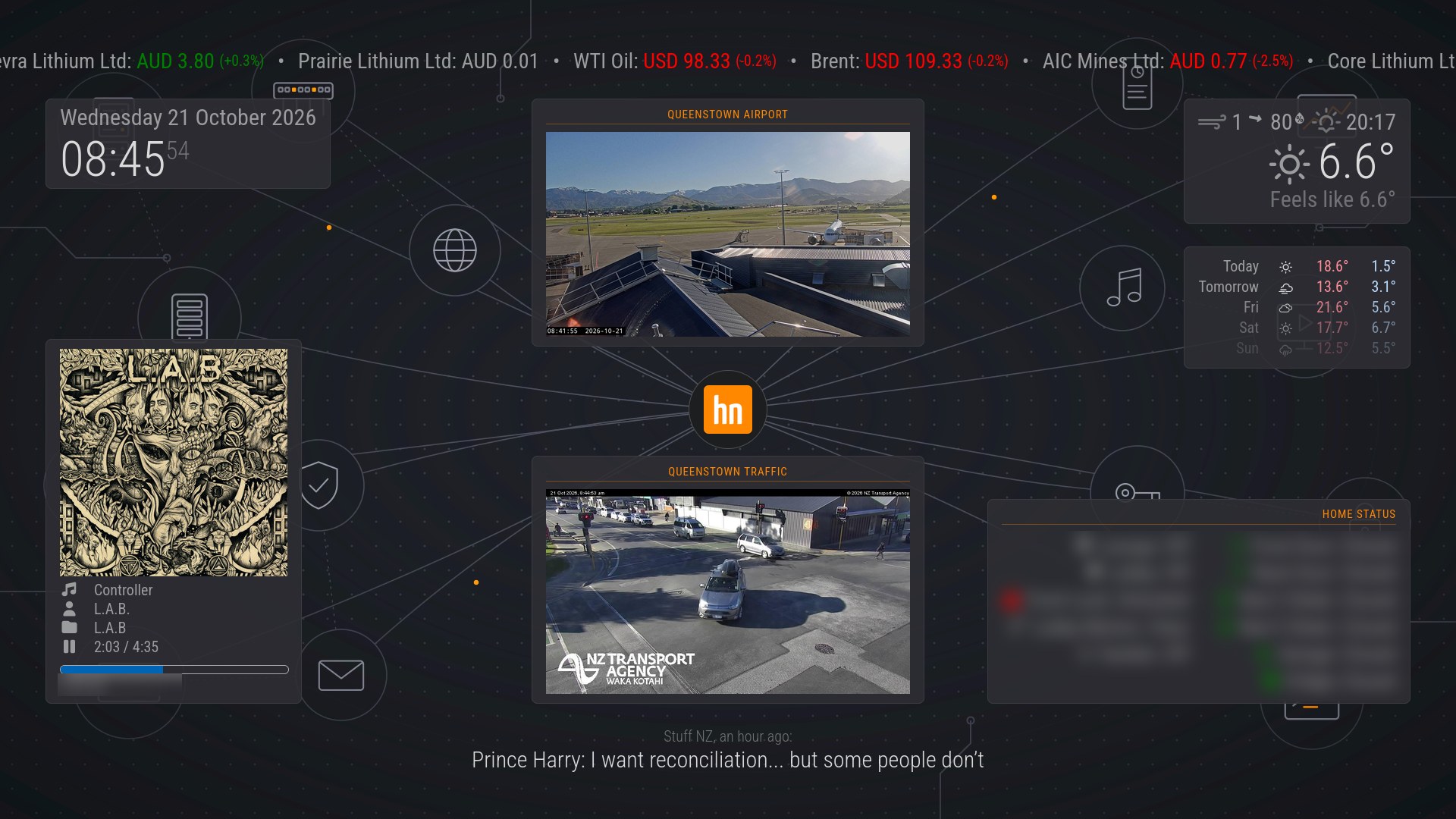
- Home (90 seconds): clock, weather and a 5-day forecast, Home Assistant states (doors, front door lock, lights, motion, fridge door and garden irrigation), Spotify now playing, two live local webcams (the airport and an NZTA traffic camera), news headlines and a stock ticker.
- Lab status (30 seconds): a read-only Grafana dashboard that answers “is the home lab OK?” from across the room. It shows a tile per server, cluster quorum, guests running, the mail queue, recent log errors and any alerts.
- Lab trends (30 seconds): the last six hours of cluster CPU, memory and network, the busiest guests, the fullest storage and log errors per host.
The line-art background, the stock ticker, the clock and the news line stay on every page. Nothing from the original dashboard was dropped to make room.
This post replaces my earlier write-up, which described the Odroid-N2 build. It covers the whole project as it stands now: the hardware history, the kiosk setup, the modules, and the new home lab pages, which are the main change in this revision. Names and addresses in the screenshots are blurred. The config snippets are illustrative examples with placeholder hosts and addresses.
Hardware: Third Time Lucky
Pi Zero W: a dead end
The first attempt used a Pi Zero W, and its ARMv6 CPU rules it out. Current Chromium, Firefox and Electron builds need ARMv7 with NEON at minimum, so a browser-based dashboard cannot run on it at all.
Odroid-N2: worked, but fiddly
The Odroid-N2 came out of the parts box. It is an arm64 board with 4 GB of RAM and eMMC storage. It ran everything, but each step cost an evening:
- The vendor image site sits behind bot protection that blocks command-line downloads. Images had to be fetched on a PC and copied across.
- A leftover Amlogic/CoreELEC bootloader on the eMMC stopped new images from booting. Zeroing the first few megabytes of the eMMC from an SD-card boot cleared it.
- Snap packages failed silently on the vendor kernel.
- The board has no Wi-Fi, so it needed a USB dongle.
Gigabyte Brix: boring, which is the point
The current host is a second-hand Gigabyte Brix mini PC. It has a dual-core Celeron 2955U, 16 GB of RAM, a 500 GB mSATA SSD, Intel HD graphics and gigabit Ethernet. It is old and modest, but it is x86. Every package is a standard Ubuntu package, and graphics acceleration works with the mainline driver.
| Pi Zero W | Odroid-N2 | Brix | |
|---|---|---|---|
| Architecture | ARMv6 | arm64 | x86-64 |
| Modern browser | No | Yes | Yes |
| RAM | 512 MB | 4 GB | 16 GB |
| Storage | SD card | eMMC | mSATA SSD |
| Network | Wi-Fi | USB Wi-Fi dongle | Wired gigabit |
| Graphics | n/a | Vendor-dependent | Mainline Intel driver |
Operating System and Kiosk Mode
The Brix runs Ubuntu Server 26.04 LTS with no desktop. It was upgraded from 24.04 in October 2026. The display stack is as small as it can be:
- The console auto-logs in on the first TTY and starts X.
- Openbox, a minimal window manager, runs the autostart script.
- The autostart hides the mouse pointer and launches Firefox in kiosk mode, pointed at the local MagicMirror² server.
- MagicMirror² runs as a systemd service in “server only” mode, and Firefox is its only client.
Things that mattered along the way:
- Snap Firefox was broken before and is fine now. It failed on the Odroid’s kernel and misbehaved in kiosk mode on 24.04, so earlier builds used the Mozilla PPA, pinned. On the 26.04 install the snap build runs in kiosk mode without trouble, so the PPA workaround is no longer needed.
- Firefox re-enables screen blanking. Turning blanking off once at session start is not enough. The autostart re-applies “no screensaver, no blanking” every minute.
- A display schedule saves the panel. Cron switches the screen off in the evening and back on in the morning. The on/off scripts look up the current X authority file each time instead of hard-coding a path, so they keep working across reboots.
- Minimal really is minimal.
cronandpingwere missing on a fresh minimal install. The webcams depend on cron, and the only symptom was frozen images.
Wired only
The Brix also has Wi-Fi, and for a while the dashboard’s name resolved to its Wi-Fi address. Pings over Wi-Fi ranged from 57 to 750 ms, against about 1 ms on the cable. Wi-Fi is now switched off entirely. The box is wired, on the trusted-clients network, with a fixed address.
Architecture
(source of truth, in git)"] Display["Display host
X11 + Openbox"] FF["Firefox kiosk"] MM["MagicMirror² server"] Pages["MMM-pages
home / lab status / lab trends"] Cam["Local webcam
file server"] Cron["cron fetch jobs"] HA["Home Assistant"] APIs["Cloud APIs
weather / NASA / Spotify / finance / RSS"] Webcams["Public webcams"] Proxy["Kiosk-only reverse proxy
(allows this display only)"] Grafana["Grafana
(read-only service account)"] Backup["Backup storage"] Dev -- "scp" --> Display Display --> FF --> MM --> Pages MM -- "WebSocket" --> HA MM --> APIs MM -- "iframe" --> Cam Cron -- "fetch images" --> Webcams Cron --> Cam MM -- "iframe, HTTPS" --> Proxy --> Grafana Display -- "rsync over SSH" --> Backup
The configuration, CSS, webcam pages, autostart scripts and backup scripts live in a git repository on a development container. That copy is the source of truth, and it is copied to the display with scp. If the Brix dies, a fresh install plus those files gets the dashboard back.
The Home Page
| Zone | Module |
|---|---|
top_bar | Stock ticker: ASX lithium stocks plus WTI and Brent crude (every page) |
top_left | Clock and date (every page) |
top_center | Airport webcam |
top_right | Current weather and 5-day forecast |
bottom_left | Spotify now playing |
bottom_center | NZTA traffic camera |
bottom_right | Home Assistant panel |
bottom_bar | News headlines (every page) |
| page background | Hillnet line-art with the hn logo at its centre (every page) |
Clock and weather. These are built-in modules. The clock shows 24-hour time in Pacific/Auckland. Weather comes from OpenWeatherMap and is shown twice: current conditions, and a 5-day forecast with sunrise and sunset.
Home Assistant. MMM-HomeAssistantDisplay keeps a WebSocket open to Home Assistant. A door opening shows within a second or two instead of on the next poll. Each entity uses a Jinja2 template to pick an icon and a colour, so an open door or an unlocked front door stands out. The Home Assistant side is covered in Home Assistant OS in My Home Lab.
Spotify. MMM-NowPlayingOnSpotify shows the current track and album art. It needs a Spotify developer app and a one-time authorisation for a refresh token, and then runs unattended. It replaced an earlier Spotify module that is now retired.
News. The built-in newsfeed module shows RNZ, Stuff NZ and BBC World. The original third-party ticker module disappeared from GitHub. 1News (broken RSS), Reuters (CORS) and the NZ Herald (feed discontinued) were tried and dropped.
Stocks. MMM-Jast pulls prices from Yahoo Finance without an API key.
Background and theme. Since October 2026 the mirror wears the same look as the rest of my lab sites (this blog, the Homelab Console, my Git server and the knowledge base): the Hillnet line-art background, with my hn logo where its lines meet, and every tile on a dark rounded card with orange headings. A stylesheet brightens only the background’s lines, not its base, so the cards still stand out. Before that, MMM-Wallpaper showed NASA pictures: first the Astronomy Picture of the Day, until its feed started returning only the NASA logo in late September 2026, then nebula images from NASA’s Image and Video Library.
Webcams through a local proxy
The airport webcam cannot be embedded directly. The site sends X-Frame-Options: SAMEORIGIN and rejects image requests without the expected referrer, so the display fetches the image itself:
- A cron job downloads the current image every minute into a local folder.
- A tiny static file server on the display serves that folder on localhost.
- A small HTML wrapper page reloads the image with a cache-busting query string, so Firefox never shows a stale frame.
- MagicMirror²’s
MMM-iFramemodule points at the local page.
The NZTA camera used to be embedded directly. It now goes through the same path, so every webcam behaves the same way and Firefox caching stops being a per-camera problem.
Home Lab Pages in Grafana
The home lab has grown a lot since the dashboard was built. It now has a three-node Proxmox cluster, a self-hosted mail server, monitoring, backups and around twenty guests. Grafana already had dashboards for all of it (see Homelab Monitoring with Grafana, Loki, Prometheus and Alloy), but I only saw them when I went looking. I look at the wall screen every day, so that is where a lab summary belongs.
Rotate, don’t replace
The first plan was to drop Spotify, the weather and a webcam to make room. Rotating pages turned out to be the better answer. MMM-pages shows one set of modules at a time and switches on a timer. Every module gets a class: fixed (on every page), home, lab_status or lab_trends. The home page shows for 90 seconds and each lab page for 30, so the screen still shows the home page most of the time, and no module was removed.
A minimal version of the rotation config looks like this, for example:
| |
Purpose-built dashboards, not the desk ones
My existing Grafana dashboards are made for a desk monitor, with dense tables, small legends and dozens of panels. From across a room they are unreadable, and the biggest of them would be heavy work for a 2014 Celeron. So the mirror has two dashboards of its own, built for a 1860 × 700 pixel frame and for reading at a distance:
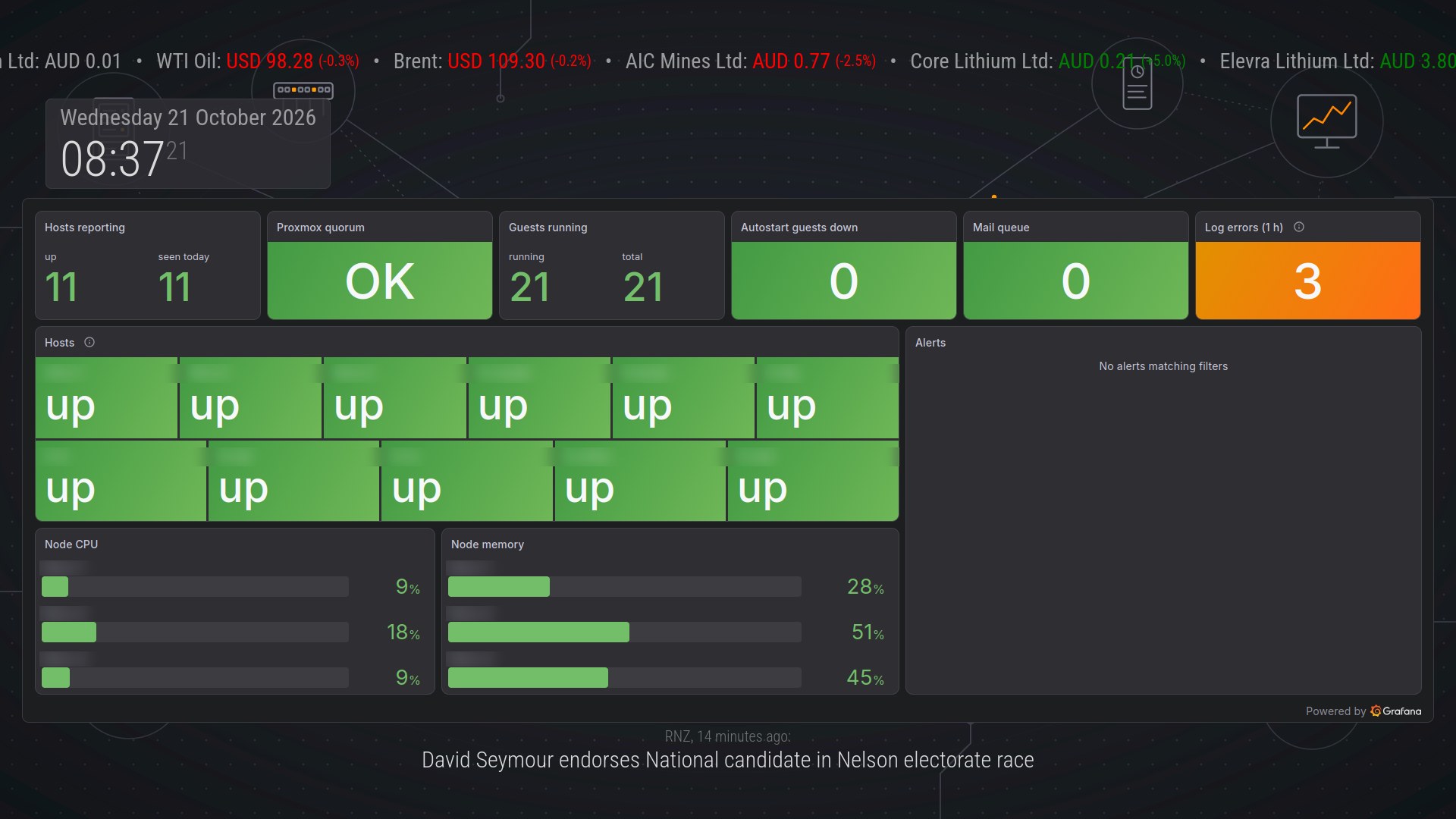
Lab status (refreshes every minute):
- Hosts reporting: how many hosts have sent metrics in the last five minutes, against how many were seen today.
- Proxmox quorum, guests running (against the total) and autostart guests that are down.
- Mail queue and log errors in the last hour from every journal and syslog source. These use the same noise filter as my “Problems” dashboard.
- A tile per host: green “up” if it reported in the last five minutes, red “DOWN” if it was seen today but has gone quiet. A host that dies stays on the board as a red tile instead of silently disappearing.
- Cluster node CPU and memory as horizontal bars.
- Alerts: firing and pending Grafana alerts. Empty is good.
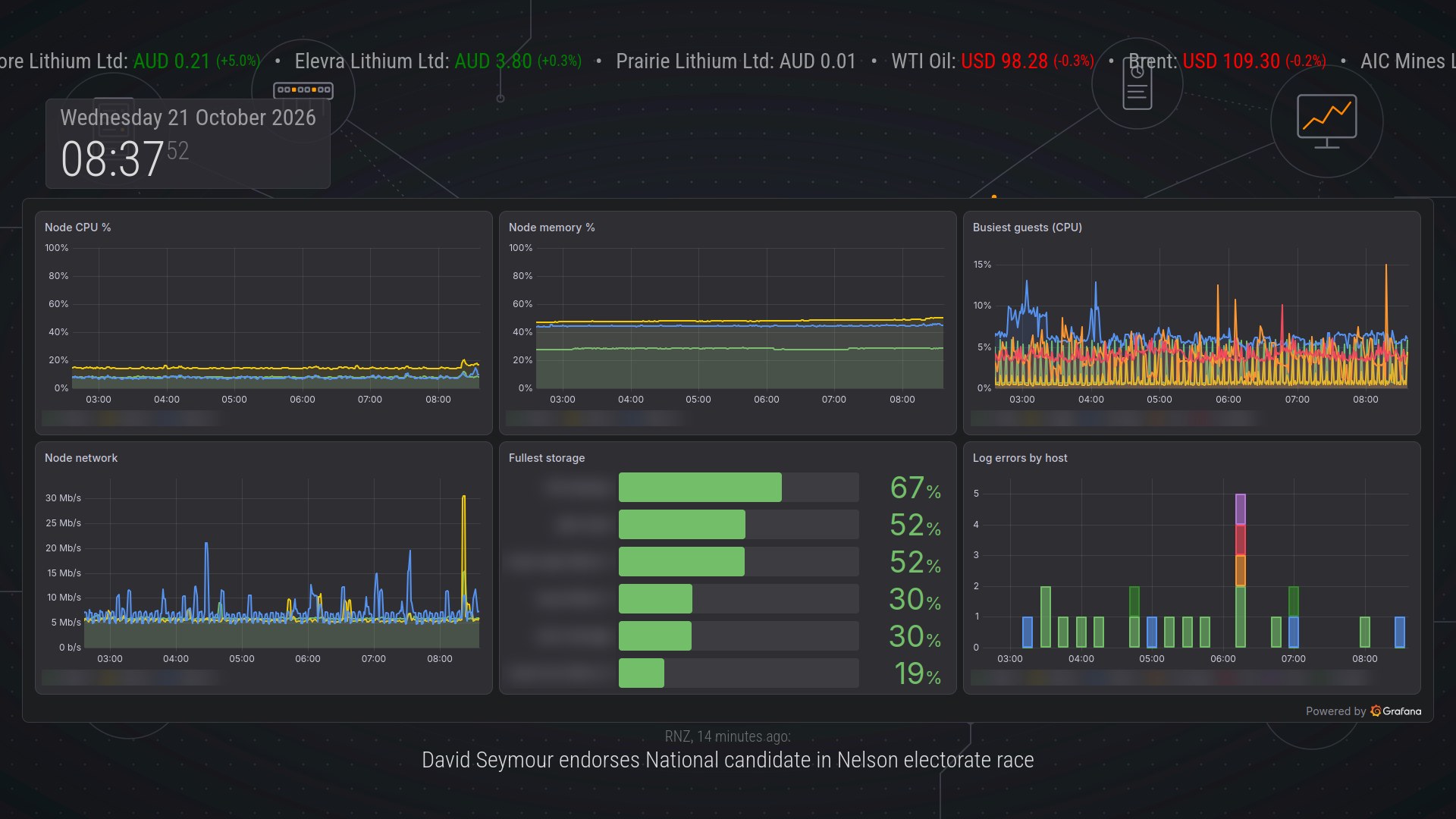
Lab trends (last six hours):
- Cluster node CPU, memory and network.
- The five busiest guests by CPU.
- The six fullest storage pools.
- Log errors by host in 15-minute bars.
Both dashboards are generated by the same Python script as all my other dashboards and are version-controlled with them. Grafana provisions them from files, so the mirror’s view of the lab is code like everything else.
Getting Grafana into the frame safely
An iframe cannot log in to Grafana, and Grafana is not open to the network. It listens only on localhost, behind nginx with TLS. I considered three options:
- Anonymous viewer access. This is the simplest, but it would open every dashboard to the whole LAN.
- Grafana’s shared (public) dashboard links. These need no login, but they work per dashboard only, with no template variables or playlists, and the link itself becomes the password.
- A kiosk-only reverse proxy that logs the display in. This is the one I picked.
The proxy is a second nginx server block on the Grafana host, with the same certificate:
- Only the display may connect. nginx allows the dashboard’s fixed address and returns 403 to everyone else.
- nginx supplies the identity. It adds an
Authorization: Bearerheader with a token for a Grafana service account that has only the Viewer role. The token sits in a root-only file on the Grafana host, outside git. The display never sees it and never has to log in. - No browser session gets through. The proxy strips cookies, so the token is the only identity.
- Only the mirror’s page may frame it. A
Content-Security-Policy: frame-ancestorsheader allows the local MagicMirror² page and nothing else.
A minimal version of that server block looks like this, for example (placeholder names and addresses; grafana_backend is an upstream block pointing at Grafana on localhost):
| |
By default Grafana refuses to be framed (X-Frame-Options: deny), so embedding has to be switched on in Grafana:
| |
That setting is global, so the normal Grafana site would lose its protection against being framed by other sites. One line in the normal nginx server block adds that protection back:
| |
Grafana’s own UI keeps the protection it had. Only the kiosk proxy can be framed, and only by the mirror.
The dashboard URLs use Grafana’s kiosk mode with the time picker and dashboard links hidden (?kiosk&_dash.hideTimePicker&_dash.hideLinks&theme=dark&refresh=1m), so the frame shows panels and nothing else.
Things that bit me
- MMM-iFrame reloads the wrong frame. The existing webcam module rebuilds its iframe on a timer, and its timers share one global variable between instances. With several copies on the page, each timer reloads whichever copy started last, so a Grafana frame would have reloaded from scratch every minute. I wrote a tiny module of about 30 lines, MMM-LabFrame. It builds the iframe once and lets Grafana refresh its own panels. As a guard against slow browser memory growth, it does a full reload every six hours.
position: fixedthat isn’t. MagicMirror²’s “third” regions are centred with a CSS transform. A transform on any ancestor makesposition: fixedrelative to that element instead of the screen. The frame lives in thefullscreen_aboveregion, which has no transform.- Inline styles win. MagicMirror² writes
style.positionon a module’s wrapper every time it hides or shows the module, and MMM-pages does that on every page change. So the positioning CSS goes on the iframe itself, which MagicMirror² never touches. The frame sits below the ticker and clock and above the news line. - Grafana’s grid is in fixed rows. Each grid row is about 30 pixels plus an 8-pixel gap, whatever the screen size, so a 700-pixel frame fits 17 rows. The first version used 20, and the bottom panels were cut off. The dashboards and the frame size now have to change together.
- “Top 5” over time is not five series. A
topk(5, …)graph picks a top five at every point in time, so the legend filled up with half the guests. The fix ranks guests once, by their average over the whole window, and graphs only those five. In PromQL that looks something like this (the metric name is an example):
| |
- Shared storage counted three times. The cluster reports shared storage (NFS backups, iSCSI) once per node. The storage panel now shows each shared pool once and local pools per node.
- Hairline bars. At Grafana’s automatic interval, log error counts drew bars one pixel wide. A 15-minute minimum interval makes them readable.
What it costs the Brix
The display host is a 2014 dual-core Celeron, and the hidden lab pages keep refreshing in the background. Before the change, the 15-minute load average was about 0.4. With the lab pages it sits around 1.3 to 1.5. The CPU is about 75% idle, and Firefox plus MagicMirror² use about 600 MB of the 16 GB. That is fine for a dashboard. If it ever matters, the simplest lever is a slower Grafana refresh, for example every two minutes.
Backups
The display backs itself up on a schedule the same way my Linux workstation does (see Building a Resilient Linux Workstation Backup System with rsync):
- A cron job runs
rsyncover SSH and pushes to a dedicated backup account on network storage. Push is fine because the display is on the trusted network, not the IoT network. - It copies the home directories, system configuration, local scripts, the cron spool and the full MagicMirror² install including
node_modules, so a restore matches exactly. - Caches are excluded, and
--deletekeeps the copy an exact mirror. - Every run sends a short “OK” or “FAIL” email through the home lab’s own mail relay.
The first run took 58 seconds and stored about 840 MB.
How This Revision Was Built
I built the home lab pages in one session with Claude Code, an AI coding assistant, working in the same git repository as the rest of my home lab. It generated the dashboard queries and checked them against the live Prometheus and Loki before deploying them. It also set up page rotation on the display and checked each layout against real screenshots of the screen. Most of the fixes above came from those screenshots.
I kept one step for myself on purpose. Creating the Grafana service-account token and writing it into nginx’s config is secret handling, and the assistant’s safety checks blocked it. The assistant wrote that step as a short script, and I ran it myself.
What Worked, What Didn’t
Worked
- Moving to x86 removed a whole class of problems: no vendor images, no bootloader clean-up, no snap breakage.
- Wired Ethernet made a clear difference. On Wi-Fi the dashboard was slow to reach and slow to update.
- WebSocket updates from Home Assistant make the home panel feel live.
- Rotating pages instead of cutting modules keeps the home view as the default, and the lab view comes round every two minutes.
- Dashboards as code: the mirror dashboards live in the same generator as the others, so they get the same label fixes and noise filters.
- A proxy that adds the credentials and accepts one address means no anonymous access, no shared links and nothing secret on the display.
Didn’t, or needed rework
- Hardware that technically works can cost far more time than an old mini PC that just works.
- Third-party MagicMirror² modules come and go. The news ticker vanished, the Spotify module was replaced, and the iframe module turned out to be unsuitable for anything that should not reload.
- The airport webcam depends on an undocumented image URL and a referrer check, so it could break at any time. That is the price of scraping.
- Dashboard layouts are tied to the frame size. Changing one means re-fitting the other.
Lessons Learned
- Check the CPU architecture first. ARMv6 cannot run a modern browser.
- Prefer boring hardware for always-on displays. Once your time counts, a second-hand x86 mini PC beats a clever SBC.
- Re-test old workarounds after an OS upgrade. Snap Firefox went from broken to fine.
- Turn blanking off after the browser starts, and keep turning it off.
- Keep the config off the device, in git, and treat that copy as the source of truth.
- Proxy awkward embeds locally. A fetch-and-serve loop with cache-busting is simple and robust.
- Design dashboards for the screen they live on. Viewing distance, frame size and grid rows matter more than panel count.
- Embed internal tools through a proxy built for that one purpose. Restrict it by address, inject a read-only identity and control who may frame it, instead of loosening the tool itself.
- Verify layouts with real screenshots. Most of the fixes above were invisible in the config and obvious on screen.
Comments