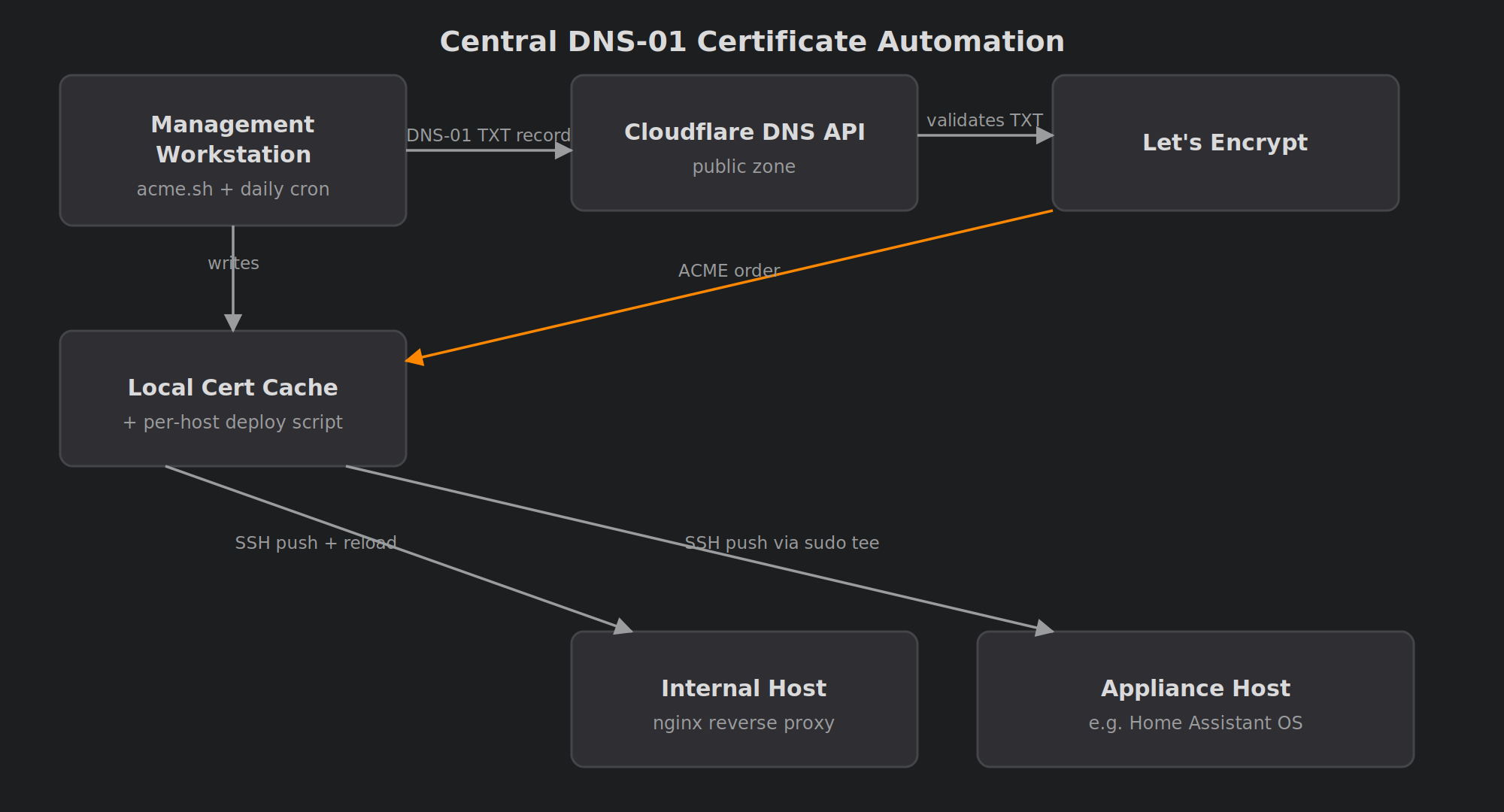
Overview
For a long time, TLS in my homelab was a patchwork. Some services ran certbot locally, some had self-signed certificates, and a few were plain HTTP with a browser warning I’d learned to ignore. Every certbot instance had its own renewal timer, its own failure modes and its own way of breaking quietly.
This project replaced all of that with one system:
- Certificates come from Let’s Encrypt and are issued by acme.sh using DNS-01 challenges.
- Validation goes through the Cloudflare API, so internal hosts never need to be reachable from the internet.
- Every hostname gets its own certificate. There are no wildcards.
- One machine does all the issuing. After each renewal it pushes the certificate to the target host over SSH and runs a per-host reload command.
- Renewal is unattended through acme.sh’s own daily cron job.
The system now covers about twenty internal services: reverse-proxied web apps, apps with built-in TLS, Home Assistant, Proxmox Backup Server, a network controller and a NAS.
All hostnames and domains in this post are anonymised. example.com stands in for my real domain, and int.example.com stands in for the internal subdomain.
Architecture
acme.sh + daily cron"] CF["Cloudflare DNS API
(public zone)"] LE["Let's Encrypt"] Cache["Local cert cache
+ per-host deploy script"] H1["Internal host
nginx reverse proxy"] H2["Internal host
app with built-in TLS"] H3["Appliance-style host
(e.g. Home Assistant OS)"] NAS["NAS
(manual import)"] WS -->|"DNS-01 TXT record"| CF LE -->|"validates TXT"| CF WS -->|"ACME order"| LE WS --> Cache Cache -->|"SSH push + reload"| H1 Cache -->|"SSH push + convert + restart"| H2 Cache -->|"SSH push via sudo tee"| H3 Cache -.->|"email reminder"| NAS
The flow for one host looks like this:
- acme.sh asks Let’s Encrypt for a certificate for
service.int.example.com. - acme.sh creates the
_acme-challengeTXT record through a scoped Cloudflare API token. - Let’s Encrypt checks the TXT record and issues the certificate.
- A generated deploy script copies
cert.pem,key.pemandfullchain.pemto the target host over SSH, using a dedicated deploy key. - The script then runs that host’s
reload_cmd. This might be an nginx reload, a service restart, a format conversion or a permissions fix.
The host list is a single declarative YAML file. Each entry gives the hostname, the SSH target and user, the remote certificate path, and the reload command. Optional flags cover the awkward cases, such as forcing RSA instead of ECDSA or writing files through sudo.
Design Decisions
Why acme.sh instead of certbot
acme.sh is a single shell script. It has a native Cloudflare DNS plugin and its own cron installer. There’s no Python environment to maintain, and it works well as the “issuing station” in a push model. Certbot can do this too, but acme.sh needed less glue.
Why DNS-01
HTTP-01 needs port 80 on each host to be reachable from the internet. Internal services should never meet that requirement. DNS-01 only needs the ability to write a TXT record in the public zone, so the services stay entirely on the LAN.
One Cloudflare detail caught me out: you can’t delegate a subdomain like int.example.com as its own zone without the Enterprise plan. The API token is therefore scoped to the parent zone, with DNS Edit permission only. That is broader than I’d like in theory. In practice it is the narrowest scope the free plan allows.
Why per-host certificates and not a wildcard
A wildcard would mean one certificate to manage. It would also mean the same private key on twenty machines, so compromising any one of them would expose all of them. With per-host certificates, every key lives only on its own host and on the issuing workstation.
The cost is that every hostname ends up in public Certificate Transparency logs. For me that was acceptable, because the names resolve only on the LAN. You should still make that choice deliberately.
Why push instead of pull
Each host could run its own ACME client. That would put a DNS API token on every host, which is exactly the sprawl I was trying to remove. In the push model, only one machine holds the token. The hosts only need to accept an SSH key.
Why ssh "cat > file" instead of scp
I originally planned to use scp or rsync. Then I hit Home Assistant OS. Its SSH add-on has no sftp subsystem, so modern scp fails. Piping the file into ssh host "cat > /path/file" works everywhere, has no extra dependencies, and became the standard method for all hosts. Where the deploy user can’t write to the target directory, a flag switches the command to sudo tee.
The Long Tail of “Reload”
Getting a certificate onto a host turned out to be the easy part. Most of the effort went into the many different ways applications want to consume it. The reload command handles all of these differences:
- nginx reverse proxy. This is the simplest case, a plain
systemctl reload nginx. Apps with no TLS support of their own get an nginx front on the same container. - Apps that want PKCS#12. Jellyfin and the *arr family (Sonarr, Radarr and friends) need a
.pfxfile. The reload command runsopenssl pkcs12 -exportand then restarts the app. I used an empty export password, since the key sits on the same disk with the same permissions anyway. - Apps running as a non-root user. A root-owned key with mode 600 is unreadable to these apps. The reload command sets
root:<service-group>ownership and mode 640 before restarting. - Combined PEM. Pi-hole’s built-in web server wants the certificate and key in one file. The reload command concatenates them.
- Proxmox Backup Server. The files are copied into PBS’s own proxy certificate location, then
proxmox-backup-proxyis reloaded. - Home Assistant OS. The restart must run in a login shell. Otherwise the supervisor token isn’t in the environment and
ha core restartfails with an auth error. - The NAS. The NAS appliance manages its own certificate store. I didn’t want to reverse-engineer it, so its “reload” is an email asking me to import the new files. It’s not elegant, but it’s honest.
What Worked / What Didn’t
Worked
- A declarative host list. Adding a host means adding a YAML entry, installing the deploy key and running the script once. After that, renewal is automatic.
- A 30-day renewal window. acme.sh checks daily and reissues when fewer than 30 days remain. If the workstation is off for a week, nothing expires.
- Retiring certbot completely. I now have one log, one schedule and one place to look.
Didn’t (at first)
- The network controller’s internal certificate. At first I put the Let’s Encrypt certificate straight into the controller’s internal certificate store. The web UI looked fine. However, an internal component checks that same certificate against the loopback address, and a public certificate can never match it. The built-in updater silently stopped working for months. The fix was to leave the vendor’s self-signed certificate alone and put a small nginx TLS front in front of the UI, serving the Let’s Encrypt certificate there instead.
- An app that regenerates
nginx.conf. One dashboard app rewrites the main nginx config on every start, so my TLS block kept disappearing. The fix was a separate nginx config file plus a systemd drop-in that points the system nginx at it, so the app never touches that file. - Ports already in use. When an app and nginx both want the same port, nginx fails to start. Some apps needed their HTTP listener moved so nginx could take the original port and redirect to HTTPS.
- DNS. Several services share one container, so each one needs its own local DNS record. Devices on VLANs that use Pi-hole for DNS also needed conditional forwarding for the internal subdomain before the names resolved.
Tradeoffs
Advantages
- No internal host is exposed to the internet for validation.
- The DNS API token lives on exactly one machine.
- Each private key exists only on its own host and on the issuer.
- New hosts take minutes to add.
- Every quirk lives in a version-controlled reload command, so nothing is hidden in someone’s shell history.
Limitations
- Renewal depends on a single machine being up and its cron job running.
- Hostnames become public through Certificate Transparency logs.
- On the free plan, the Cloudflare token can edit the whole parent zone.
- Appliances with proprietary certificate stores may still need manual steps.
- Restarting an app to pick up a new certificate briefly interrupts it. Usually nobody notices.
Lessons Learned
- DNS-01 is the right default for internal TLS. Once it’s set up, “is this host reachable?” never matters again.
- Issuing is easy. Consuming is the real work. Budget most of your time for per-app formats, file ownership and restart behaviour.
ssh "cat > file"is the most portable file transfer there is. It works where scp and sftp don’t.- Don’t replace a vendor’s internal certificate. If an appliance uses its certificate for internal loopback checks, put a TLS proxy in front instead.
- Watch out for apps that own their config files. If an app regenerates a config file, don’t fight it. Point the service at a file the app doesn’t know about.
- Per-host certificates beat wildcards for blast radius. Just accept that your hostnames will be public.
- Keep the reload command next to the host definition. Six months later, that one line is the whole explanation of why the service works.
Comments