Overview
My home lab had grown to about a dozen admin web interfaces, and each one had its own local password. Some of those passwords were good and some were not. One interface had no login at all. This project replaced all of that with a single identity provider. I now sign in once with a passkey, and every admin UI in scope opens without another prompt.
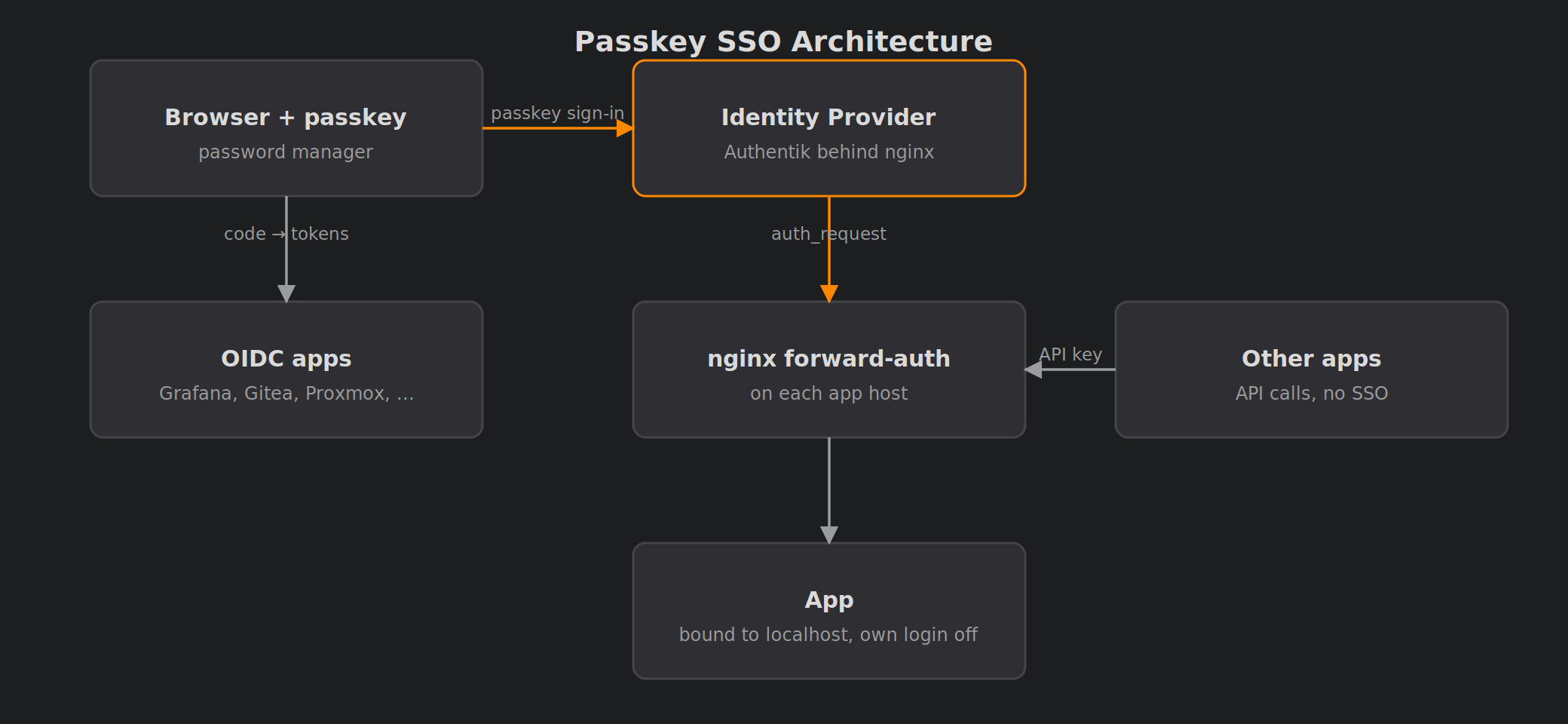
The identity provider is Authentik. It runs in its own container on my Proxmox cluster under HA. Applications connect in one of two ways:
- Native OIDC (seven apps): Grafana, Gitea, Proxmox VE, Proxmox Backup Server, Homarr, Portainer and BookStack.
- nginx forward-auth (six apps): Prowlarr, Radarr, Sonarr, Lidarr, SABnzbd and qBittorrent. None of these speak OIDC.
Host names, domains and addresses in this post are anonymised. The snippets are illustrative examples, not my real configuration.
Architecture
OIDC apps work like this:
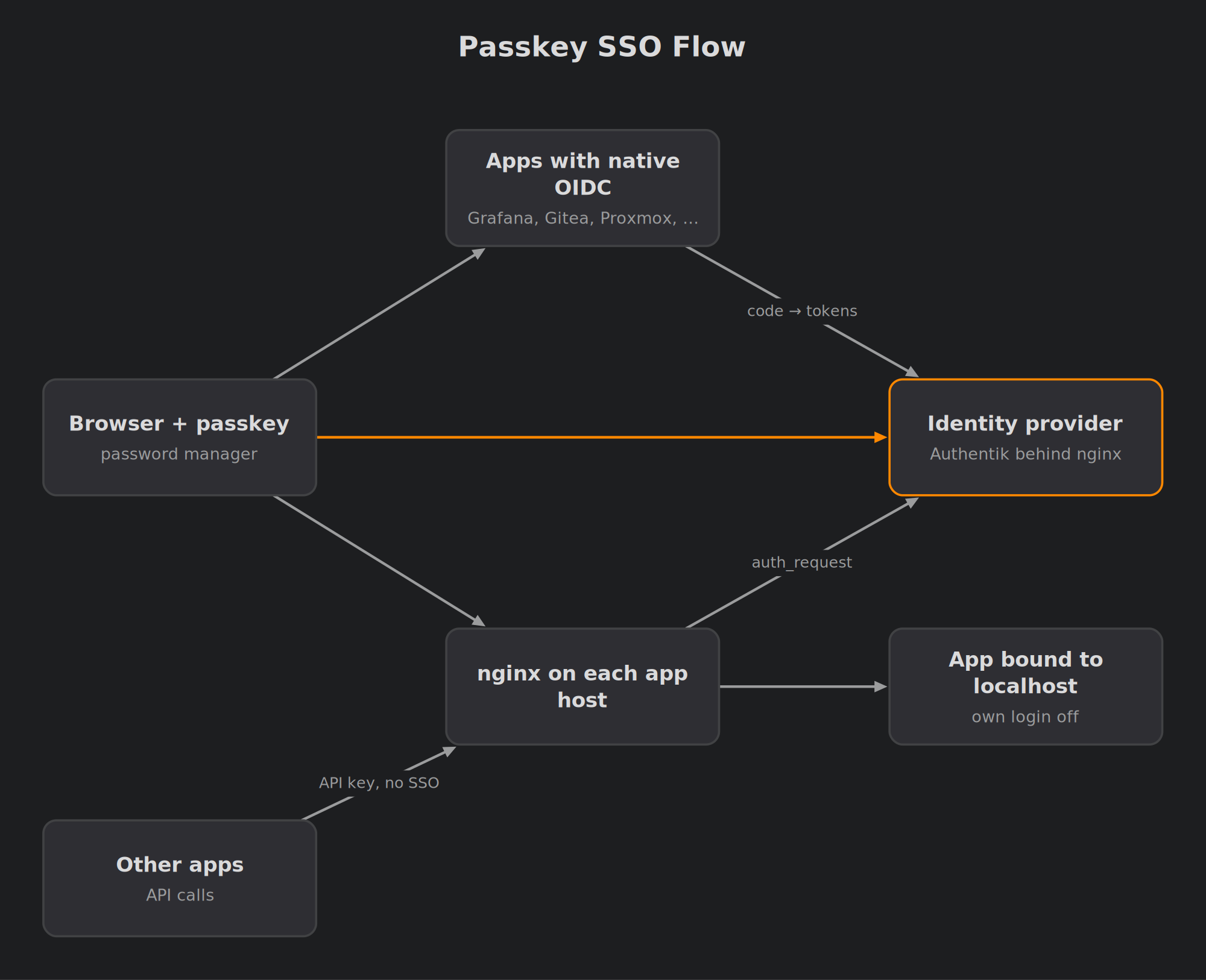
- The app’s “Authentik (passkey)” button redirects to the identity provider.
- The browser offers the passkey through autofill.
- Authentik checks that I’m in an administrators group bound to that application.
- Authentik redirects back with a code.
- The app exchanges the code for tokens and logs me in.
Forward-auth apps have nginx in front of the application. On every browser request, nginx asks Authentik’s embedded outpost whether this browser has a valid session. If it doesn’t, the browser goes through the same sign-in. It comes back with a cookie scoped to my internal domain. The app listens only on localhost, with its own login set to “External”, so nginx is the only way in.
One Authentik session covers everything. After the first passkey touch of the day, the other apps open directly.
Key Design Decisions
Authentik over a lighter stack. I first planned Pocket ID plus oauth2-proxy. I switched to Authentik for three reasons:
- It handles both OIDC and forward-auth in one product.
- A family member works with it professionally, so help is a phone call away.
- I keep the install completely stock, so the upstream docs always apply.
The only local change is a Compose override that removes the Docker socket from the worker. That socket is only needed for Docker-managed outposts, and I don’t use those.
A dedicated container. Authentik runs in its own unprivileged LXC with Docker inside. I deliberately keep it away from my general Docker host, where some containers have the Docker socket mounted. Docker-in-LXC can break on kernel or runc updates, so the Docker packages are on apt-mark hold. I upgrade them only on purpose. Each upgrade comes after a backup and is followed by a sign-in test.
Passkey only for the everyday account. My daily user has no usable password at all. Its WebAuthn credential lives in my password manager, which syncs it to every device. User verification and resident keys are required, so enrolment creates real discoverable passkeys. A separate superuser keeps a long password, stored in the password manager. That account is the break-glass way into Authentik itself.
Every app keeps a way in without SSO. This is the most important rule in the project. Authentik must never be the only way into the systems needed to fix Authentik. Before I called each application done, I stopped Authentik and proved I could still get in.
Wiring Up the OIDC Apps
Most apps took a few minutes each. A few needed extra care.
Grafana maps Authentik groups to roles through a JMESPath expression. A minimal version of its environment looks like this:
| |
Setting the root URL also fixed a latent bug. Before this, alert e-mails linked to localhost instead of the real address.
Proxmox VE and PBS use an OpenID realm. For example, on a PVE cluster:
| |
Auto-create is off, and I created the SSO user by hand with admin rights. Adding someone to Authentik therefore doesn’t give them Proxmox. One Authentik provider with a regex redirect URI covers all three cluster nodes.
I pre-linked BookStack’s existing admin account to my Authentik subject. SSO therefore landed on that account and didn’t create a duplicate. The catch is that BookStack in OIDC mode has no local login form. Its break-glass is a one-line switch back to standard auth plus a container restart. I rehearsed it.
Forward-Auth for the *arrs
The pattern is the same on every host. nginx terminates TLS, checks the session, and proxies to the app on 127.0.0.1. I also kept nginx listening on each app’s old port, so bookmarks and other apps’ settings didn’t need changing. A trimmed-down example, using Prowlarr’s default port:
| |
Machine paths skip the SSO check, but each one still requires the app’s API key. Getting that list right matters. Sonarr, Radarr and Lidarr search and grab through Prowlarr’s per-indexer proxy paths. Without those bypasses, every search would have failed. App-to-app traffic now keeps working even when Authentik is down. I tested that too.
I changed the apps in a fixed order:
- Put nginx in front, with the app untouched.
- Repoint the callers and test them.
- Bind the app to localhost and switch its login to External.
- Verify that the old LAN port is refused.
Because of this order, no app was ever reachable without a login during the change.
qBittorrent was the awkward one. Its web UI is JavaScript calling its own API. nginx therefore allows the API path in two cases: with a valid SSO session, or from the handful of hosts that legitimately call it. qBittorrent’s own login is bypassed only for the internal Docker network that nginx’s connections come from. Nothing else shares that network.
Certificates got simpler as well. On these hosts, the DNS-01 push system now just reloads nginx. It no longer builds a PKCS#12 bundle and restarts the app.
Security Fixes Along the Way
Auditing every login turned up things I’m glad I found:
- SABnzbd had no web login at all, and was open to the whole LAN. It’s now SSO-only and localhost-only. Its systemd unit forced a listen address on the command line, so this needed a drop-in to override it.
- The *arrs’ plain-HTTP ports and qBittorrent’s port were reachable from the LAN, bypassing everything. They now listen only on localhost.
- Gitea had open self-registration and legacy OpenID 2.0 sign-up enabled. Both are now off.
- TLS private keys pushed by the certificate system were world-readable on several hosts. They’re now mode 600, and new keys are written under a strict umask.
What I Left Out, Deliberately
Not everything belongs behind SSO:
- The password manager. It holds the break-glass credentials.
- My LAN-only console. It has its own passkeys and is part of the recovery path.
- Jellyfin. TV and phone clients can’t do browser SSO.
- Home Assistant and UniFi. Home Assistant has no native OIDC, and UniFi only accepts vendor accounts.
- The NAS. I tried it. Authentik approved the login, then the NAS rejected it, because its firmware maps OIDC only to directory users. Making file sharing depend on the identity provider through LDAP wasn’t worth it, so I reverted. The NAS keeps its own login with two-factor authentication.
- SSH and workstation logins. These would make recovery depend on the thing being recovered.
Tradeoffs
Advantages
- One phishing-resistant sign-in for every admin UI, and one place to see and end sessions
- Fewer services listening on the LAN than before
- App-to-app automation unaffected by the identity provider being down
- A tested way in for every app without Authentik
Limitations
- Daily convenience now depends on the identity provider. HA, encrypted database backups with a tested restore, and break-glass logins mitigate this.
- Docker inside LXC is fragile across upgrades. Held packages and pre-upgrade backups mitigate this.
- Apps with their own sessions, such as Grafana, keep them until their tokens are refreshed. Short token lifetimes keep that window small.
- A few machine-to-machine calls are allowed by source rather than by a password. They are limited to specific hosts and paths, and each still needs the app’s API key where the app supports one.
Lessons Learned
- Test with the identity provider stopped. A single
docker compose stop serverexposes every missing break-glass path. - OAuth2 providers created through Authentik’s API can have empty grant types. The symptom was a vague “request is otherwise malformed” error. If you script provider creation, set the grant types explicitly, for example:
| |
proxy_ssl_verify_depthdefaults to 1, and that fails on a Let’s Encrypt intermediate. Set it to 2 or more.- In nginx,
returnruns beforeauth_request. A protected location must useproxy_pass, or it will happily serve the page unauthenticated. - Tell the embedded outpost its real URL. Otherwise it redirects browsers to
http://localhost. - Homarr asks for a
groupsscope that Authentik doesn’t offer. Override the scopes toopenid email profile, because groups arrive withprofileanyway. - Know how to recover Authentik itself. If the admin password ever fails, you can generate a one-time recovery link on the host:
| |
- An SSO project is really a login audit. The biggest security win wasn’t the passkey. It was finding the services that had no login at all.
Monitoring follows my usual Grafana and Loki setup, and Authentik’s own event log shows every login and authorisation. After a day of living with it, the best measure of success is that I’ve stopped noticing logins altogether.
Comments