Overview
For a long time my home lab ran on a set of helper scripts. I ran them by hand from my desktop. One issued and deployed TLS certificates to internal hosts. Another turned notes into pages for my internal documentation wiki. A third published posts to this site. They worked, but they had problems:
- They only worked from one machine.
- They depended on credentials sitting in my desktop profile.
- They left no record of what ran, when, or with which inputs.
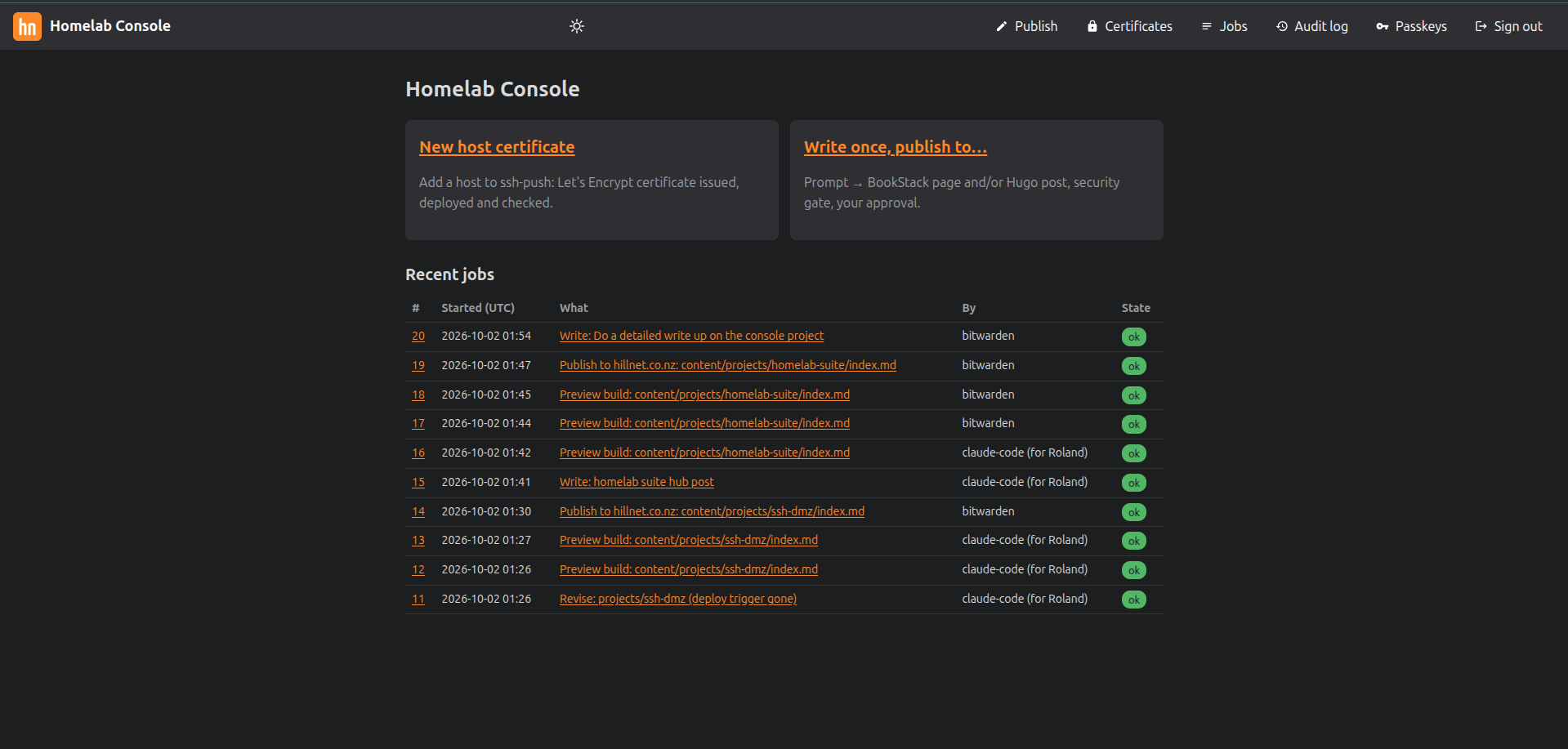
The replacement is a small web console. It runs in one hardened container, and you can only reach it from the LAN. It has a few screens:
| Screen | What it does |
|---|---|
| Publish | Turns an instruction into a wiki page or blog post. Claude drafts it, a security gate checks it, I review it, then it’s committed. |
| Certificates | Adds a host to the certificate automation: issue, deploy over SSH, reload, verify. |
| Jobs | Every action runs as a job with a live log, and the log is kept. |
| Audit log | Every sign-in and change: who, when, from where, inputs and result. |
| Passkeys | The credentials allowed to sign in. |
All host names, addresses and account names below are placeholders, and the snippets are illustrative rather than my real configuration.
Why One Container Instead of My Desktop
The main reason was to shrink the blast radius. The certificate tooling needs a DNS API token and an SSH deploy key. The publishing tooling needs Git write access. Having those on my everyday workstation, next to a browser and an email client, felt wrong.
Moving everything into one dedicated container let me:
- Give each job its own Unix account and its own credentials, with no password logins.
- Put a default-deny firewall in front of the container. It allows the web ports only from a short list of my own devices.
- Keep it entirely off the internet: no port forward and no public DNS.
- Reach my documentation from my phone, not just from one desktop.
Privilege is split with very narrow sudo rules. The web app can call exactly one validating helper as the certificate user. That user can do exactly one privileged thing: reload the web server. A minimal version looks like this:
| |
(passkey)"] -->|HTTPS| P["Reverse proxy
in the container"] P --> A["Console app
(unprivileged user)"] A --> DB[("SQLite
passkeys · sessions · audit · jobs")] A -->|text in, text out| C["Claude
(headless, no tools)"] A --> G["Security gate"] A -->|scoped account| GIT["Git server"] GIT --> W["Docs wiki"] GIT --> S["Public site"] A -->|one validated helper| CERT["Certificate user"] CERT -->|SSH deploy| H["Internal hosts"]
Passkey-Only Sign-In
The console has no passwords at all. Sign-in uses WebAuthn passkeys, and a session lasts 30 days per browser. My password manager stores the passkey and syncs it, so every device where I’ve installed the extension can sign in.
Enrolment is deliberately out-of-band. Only someone with SSH access to the container can create a new passkey. A small command prints a one-time link that expires after 15 minutes. You open it on the new device and register. That’s also the recovery path if every passkey is lost. SSH access to the host is the root of trust, and the web UI can never hand out new credentials by itself.
Sometimes a guest machine needs access for an afternoon. For that case, the firewall has a set whose entries expire on their own. They are also cleared on reboot. For example:
| |
A Fixed Menu, Not a Shell
The rule I designed around: the browser chooses from a fixed list of actions, and nothing it sends ever reaches a shell.
- Every input is validated against a narrow pattern: host names, lab-only address ranges, known service types.
- Commands are built as argument lists, never as strings.
- Each action shows a preview first: the exact config entry, a DNS check, and what will run. It then needs an explicit confirmation.
- Every change writes an audit entry, including an excerpt of the job log.
In Python, the difference between a string command and an argument list is the whole point:
| |
The Certificates screen also forced me to stop trusting things by default. Before the console deploys anything to a new host, it shows the SSH host key fingerprints that host presents. I compare them against the key I read directly on the hypervisor, then tick a box. After deploying, the job connects to the service and checks that the certificate it serves is the one that was just issued.
The usual web hardening applies too:
- An Origin check on every POST.
SameSite=Strictcookies.- A strict Content-Security-Policy with no inline scripts or styles.
The front-end library is vendored and loaded with a Subresource Integrity hash, for example:
| |
Claude Drafts, the Gate Decides, I Approve
The Publish screen is where AI comes in, and I wanted it boxed in tightly. I write an instruction, not finished text. I can optionally attach source material such as a README or a Word document. Claude then runs headless:
- no tools
- no MCP servers
- no settings
- an empty working directory
It gets text in and gives text out. It can’t touch the filesystem, the network or Git. This post was produced exactly that way.
The draft then goes through a deterministic security gate. This is plain code, not another model, so it gives the same answer every time. The gate has two modes:
- Internal mode, for the documentation wiki, blocks secret values.
- Public mode, for this site, also blocks internal host names, private addresses, internal domains, email addresses and similar identifiers.
Any finding blocks approval. Public drafts get one automatic fix pass. If anything is still flagged after that, a human has to edit the text. A toy version of the idea:
| |
After the gate passes, I review each page:
- a rendered preview
- a diff against the live version, if one exists
- an inline editor whose “save” re-runs the gate
Approving commits only that page’s file. The commit is made under a dedicated Git account that can write only to the repositories it publishes to. The commit step refuses to run if anything else in the working copy changed. For blog posts, the job then watches the live URL until the new text appears.
Sandboxed Previews
Generated content is untrusted by definition. A model could emit hostile HTML, or a source document could smuggle some in. So previews never render on the console’s own origin.
A wiki preview is rendered inline but sanitised. A blog preview is a real site build, made with the same Hugo version and flags as the production web server, so what I see is what will ship. It’s served from a separate origin, at an unguessable per-draft URL. Even a malicious script in a draft can’t read the console’s cookies or post to its endpoints. The browser’s same-origin policy does the work.
What Worked / What Didn’t
Worked well
- Passkeys plus SSH-based enrolment. There are no passwords to phish, and recovery is boring and well understood.
- Jobs with persistent logs. “What happened last Tuesday?” is now a page, not an exercise in archaeology.
- The gate as code. It catches things I’d skim past, and it never gets tired.
- Single-file commits. Approving one post can’t accidentally publish something else.
Less smooth
- Dependency pinning versus distro packages. I use Debian’s Python packages wherever possible, so they get security updates through apt. The WebAuthn library comes from PyPI, hash-pinned to the newest release whose dependencies Debian still ships. Upgrading it means a deliberate decision, not a routine update.
- Keeping preview and production in lockstep. If the Hugo versions drift apart, previews quietly lie to you. I now check the version on both machines as part of updates.
- Long-lived AI login. The headless client uses an account session that eventually expires. When it does, generation jobs fail clearly, and signing in again is a one-minute task.
- Restarts mid-job. A job that was running during a service restart is marked failed on start-up, so I just re-run it. That’s simple, but not elegant.
Lessons Learned
- Move credentials off the desktop first. Everything else followed from giving each job its own account and its own minimal sudo rule.
- Make the browser choose, not type. A fixed action list with argument-list execution removes a whole class of bugs.
- Put a deterministic check after the model. The AI is good at drafting. Simple, predictable code is better at saying “no” consistently.
- Treat generated output like user uploads. A separate origin for previews costs little and closes a real hole.
- Build the rollback before the firewall change. I apply nftables changes with a timer that restores the old ruleset unless I cancel it from a fresh SSH session. For example:
| |
- What I’d do differently: write the test suite from day one, not halfway through. Also, decide earlier where the app’s dependencies come from. Retro-fitting pinning and distro packaging was more work than starting with it.
The console is small, a few screens and a few dozen tests. But my lab’s most sensitive chores now run in one place, behind one door, with a written record of every time that door opened.
Comments