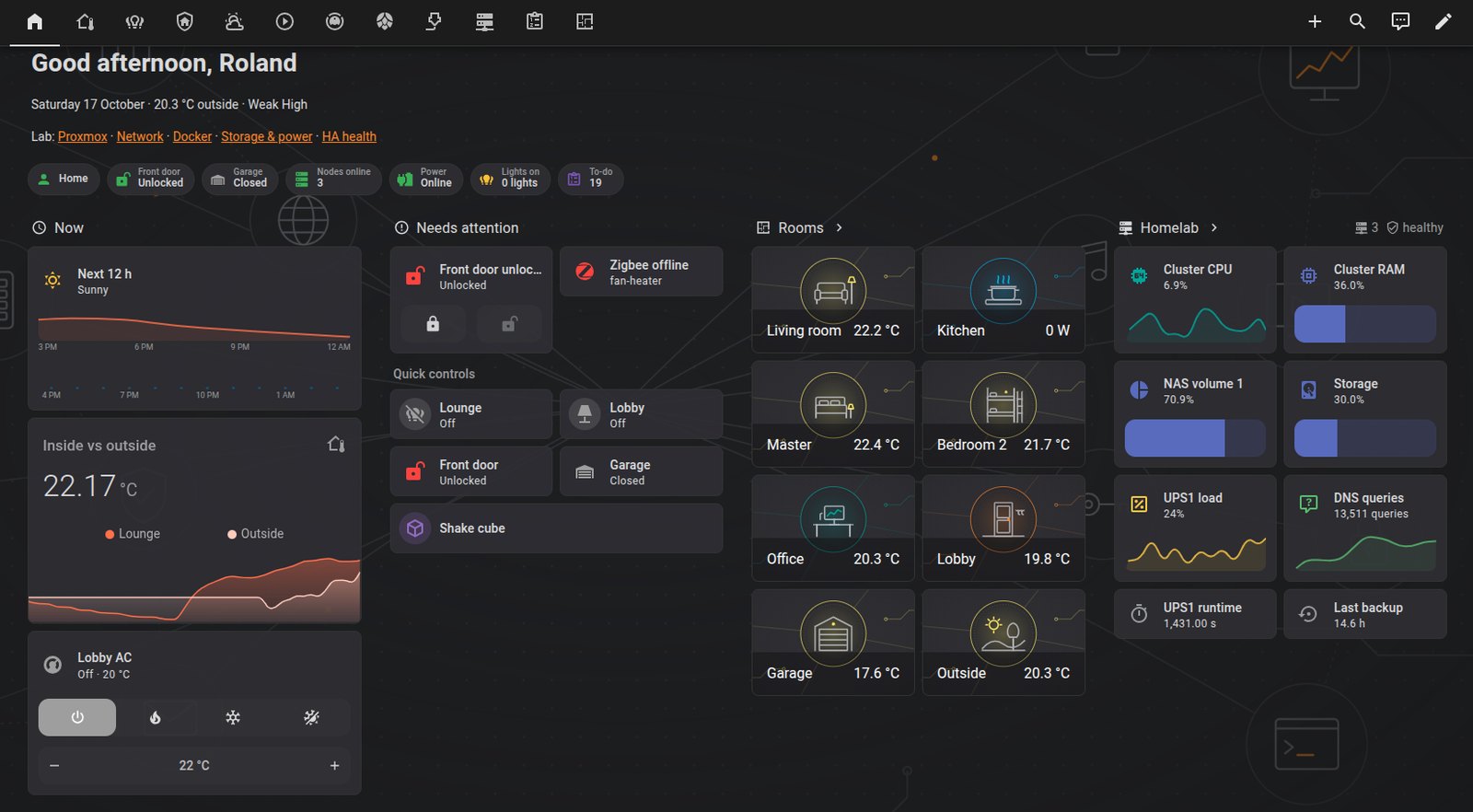
Overview
This is a revised overview of how my Home Assistant installation is put together. A lot has changed since the first version in March. The hardware is different, most of the add-ons I listed are gone, and the dashboards have been rebuilt from scratch. Version numbers, names and addresses are left out or anonymised, and the code snippets are illustrative examples rather than my real settings.
| Key | Value |
|---|---|
| Installation Type | Home Assistant OS, bare metal |
| Hardware | ODROID-N2 (aarch64) |
| Size | About 280 devices, 2,000 entities, 70+ integration entries, 11 areas |
| Device fleets | 10 ESPHome nodes, 29 Zigbee devices, 6 Bluetooth sensors, a 433 MHz gateway |
| Database | SQLite recorder, about 1 GB |
| Network | LAN only: on the server VLAN with the rest of the home lab, plus a second leg on the IoT VLAN |
Architecture
Home Assistant sits at the centre of several radio and network paths. Zigbee devices come in through Zigbee2MQTT and the Mosquitto broker. ESPHome nodes on the IoT network talk to it over the native API. Bluetooth sensors are picked up directly and through two ESPHome Bluetooth proxies.
wall dashboard"] -->|HTTPS| HA["Home Assistant OS"] ZB["Zigbee coordinator"] --> Z2M["Zigbee2MQTT"] --> MQTT["MQTT broker"] --> HA RF["433 MHz gateway"] --> MQTT ESP["ESPHome nodes
(IoT network)"] -->|native API| HA BLE["Bluetooth sensors"] --> PROXY["Bluetooth proxies"] --> HA HA --> LAB["Home lab integrations
(hypervisor, NAS, UPS, DNS)"] HA --> BK["Encrypted backups"] HA -->|SMTP| MAIL["LAN mail relay"] HA -->|push| PHONE["Companion app"]
A few decisions shaped the whole setup:
| Decision | Why |
|---|---|
| Stays outside my passkey SSO | It has its own users, and the companion app needs its own login |
| LAN only | Everything is used at home or over VPN |
| Dashboards edited over the WebSocket API, sources in git | Same as the UI does it, no restart, and the repo is the source of truth |
| Config repo is an allowlist snapshot, not a live checkout | The config directory holds secrets and machine state; only listed files are copied out, then scanned |
| ESPHome secrets in one secrets file | Device YAML can then be versioned safely |
| A second network leg on the IoT VLAN | Some TVs only accept remote control from their own subnet (see below) |
The core configuration.yaml stays small. A minimal version of mine looks like this; everything else is configured in the UI:
| |
Add-ons and Integrations
The add-on list is much shorter than in March: Mosquitto, Zigbee2MQTT, the ESPHome Device Builder, Music Assistant, an SSH terminal (protection mode left on), Samba and the File editor. InfluxDB, Grafana, Node-RED, the local voice stack and the Zabbix agent are gone. Long-term graphs now come from Home Assistant’s own statistics, and infrastructure metrics live in my Prometheus and Grafana stack.
HACS supplies a handful of community integrations (Proxmox sensors, Bambu Lab, RAPT, Sonoff) and three frontend cards: mini-graph-card, apexcharts-card and card-mod. Home Assistant Cloud provides the Google Assistant link.
| Purpose | Integrations |
|---|---|
| Home lab monitoring | Proxmox (read-only custom role, never admin), Portainer, Synology DSM, NUT, Pi-hole, UniFi Network, Certificate Expiry |
| Climate and weather | Met.no, OpenWeatherMap, a 433 MHz weather station, generic thermostats |
| Media | Google Cast, Spotify, Music Assistant, Samsung TV, Android TV Remote |
| Devices | ESPHome, MQTT, Xiaomi BLE, RAPT, Sonoff, Tuya, HomeKit Controller, Bambu Lab P1S |
The biggest entity sources are Proxmox, UniFi, Portainer and MQTT, each with roughly 300 to 400 entities.
Devices and Logic
The ESPHome nodes do real work: brewery pumps, heaters and thermostats for Rolling Hills Brewery, keg temperature and CO₂ pressure, the garage door, an IT cupboard fan, an LED matrix and two Bluetooth proxies.
The most interesting recent one is a small ESP32-C3 IR board controlling a Daikin split system. Using ESPHome’s native daikin climate platform with both a transmitter and a receiver means Home Assistant follows the real remote too. Decoding that remote needed two receiver changes, which I found with a raw dump. For example:
| |
Four template sensors do a lot of the dashboard work: lights on, doors open, plants dry and low batteries. Each one counts entities in a given state and is shown as a badge only when it matters. A minimal version looks like:
| |
Four Mi Flora plant sensors feed the plant integration, with limits written out per plant. The integration’s own problem text says “conductivity low”; a small template sensor per plant rewrites it in plain words (“fertiliser low”) and says “OK” when all is well, which reads better on a tile.
Automations are still deliberately few, and each does one obvious thing:
- bedside lamps on a switch and a schedule, and a shake-to-toggle Zigbee cube
- a spoken alert when the fridge has been open for two minutes
- a tap on the IR board’s touch pad toggles the lobby light
- the 3D printer’s chamber light goes off at 11 pm if it was left on
- an e-mail to the household when a plant needs water, naming the plant and where it is, with a morning reminder until it’s watered
- an e-mail to the admin mailbox when any battery drops below 30 % (replace soon) and again below 20 % (replace now), once per device per threshold
- the phone is switched to high-accuracy location while I’m away, and back when I’m home
The robot vacuum is a Tuya model whose Home Assistant entity accepts commands but never reports a state. A template vacuum wraps it: its state comes from the vacuum’s mode, and its actions are forwarded to the real one. (Mine had been forwarding them to itself, so the dashboard buttons did nothing.)
The battery thresholds come from two template sensors that list the devices under 30 % and 20 %. The automation only mails devices that newly appear in a list, so nothing repeats while a battery stays low and a restart doesn’t re-send:
| |
(Simplified: the real one compares numbers, not strings, and skips a plant sensor’s false 0 %.)
Notifications
E-mail goes through my LAN mail relay, which only delivers to an allowlist of recipients, so nothing on the network can mail arbitrary outside addresses. Adding a household member’s address meant one line on the relay.
Home Assistant 2026.10 moved SMTP from YAML to the UI and deprecated the old notify.<name> actions (YAML stops working in 2027.1, the actions in 2027.3). Each recipient is now its own notify entity, and automations send to it like this:
| |
Phone push goes to the companion app through Google’s push service. The app can also hold a permanent connection, but on my Xiaomi phone that means a permanent notification, and hiding it stopped the connection. Once the app’s notification and battery settings were fixed, plain push worked, so I don’t use the permanent connection.
Dashboards
The suite is now two repo-managed dashboards. Home · PC is the default: a four-column command centre (now, needs attention, rooms, home lab) with a tab per topic, and the room pages as sub-pages. Home · Mobile is one column: problems only, thumb-sized controls and picture tiles to every topic and room. A per-device default puts the mobile one on my phone. The original UI dashboard and the first hub version were retired once everything they did had moved across.
Design rules for the suite:
- One theme and one picture style. Line-art room and topic pictures and the same colours as my other lab sites.
- Problems only. “Needs attention” shows a card only while something is wrong, otherwise one “All quiet” line.
- One colour per measurement, on every tile and chart:
| Measurement | Colour | Measurement | Colour |
|---|---|---|---|
| Temperature | #FF7043 | CPU | #26A69A |
| Humidity | #29B6F6 | Memory / disk | #5C6BC0 |
| Power | #FFCA28 | Wind | #90A4AE |
| Rain | #1E88E5 | Gravity (SG) | #D5BC26 |
- Rows and columns. Every row fills its section and has one height. In the sections layout a section spanning N columns has 12 × N grid units, not 12, which I learned after sizing everything for 12. Plain tiles beside graph tiles are made the same height, and a small script checks every row before a push.
- Compact controls. Climate tiles with mode buttons and a −/+ target instead of big thermostat dials, grouped by room.
- Plain-word status. Plant tiles are green “OK” or red with the problem, swapped by a visibility condition.
- Short, averaged graph windows. Six hours for climate, three for power, with averaging so lines don’t saw-tooth. For example, a tile with a trend graph:
| |
The weather station gets proper history charts: temperature and humidity, wind and gusts, a week of hourly means from long-term statistics, and rainfall as bars per hour and per day. And the map now draws routes: the built-in map page shows where everyone is and their recent stops, but a route needs a map card with a history window:
| |
Layout tweaks can still be made in the UI editor; they’re then copied back into the YAML so the repo stays the source of truth. Changes are made in YAML, converted to JSON, checked so every entity ID exists, backed up from the live config, and then saved over the WebSocket API. The message is the same one the UI sends, for example:
| |
HTTPS and Backups
Home Assistant serves a real Let’s Encrypt certificate for its internal name, issued and pushed by my DNS-01 certificate automation. Renewal restarts core every couple of months, which is expected.
Backups use Home Assistant’s built-in encrypted full backups, kept in more than one place including off-site. The encryption key is also stored outside Home Assistant, because a backup you can’t decrypt isn’t a backup.
A TV That Only Listens to Its Own Subnet
The bedroom TV, a 2020 Samsung, would not pair with Home Assistant. Every attempt failed at once with ms.channel.timeOut, and the TV never showed its “Allow” prompt. Its settings were all correct: access notification on, nothing denied in its device list. Restarting it, even pulling the plug, changed nothing.
The useful test was to repeat the pairing request from a machine on the TV’s own subnet. I gave one of the hypervisor nodes a temporary address on the TV’s network for a minute and sent the same request from there. The prompt appeared straight away. A token issued that way still didn’t work from Home Assistant’s server VLAN. So the TV doesn’t just pair locally: it refuses every remote-control connection from another subnet.
The fix was to put Home Assistant on the TV’s network rather than the other way round:
The TV moved to the IoT VLAN, where TVs belong anyway, with a fixed address and a DNS name.
Home Assistant got a second interface on that VLAN. Its switch port already carried the IoT VLAN tagged, so Home Assistant OS only needed a VLAN interface on the same cable. For example:
1
2
# illustrative: add a tagged VLAN interface with DHCP on the existing network port ha network vlan eth0 <vlan-id> --ipv4-method auto --ipv6-method disabledIts main address and default route stay on the server VLAN; only traffic to IoT devices uses the new leg.
Pairing then worked first time. The integration needed one reload before it accepted commands.
Switching the TV on is a separate problem. In standby it drops off the network, so the integration can’t reach it. It does listen for a Wake-on-LAN packet, but only one sent to the IoT VLAN’s broadcast address. A unicast packet goes nowhere, because nothing knows the sleeping TV’s hardware address any more. The Wake on LAN integration sends that broadcast, and an automation on the Samsung integration’s “turn on” trigger presses it, so the TV’s power button works from any dashboard tile.
Tradeoffs
Advantages
- Dashboards are versioned and reviewable, and can be rebuilt from git
- Secrets never leave the box; the config repo is checked before every commit
- Small, readable YAML; the UI handles the rest
- Fewer add-ons means fewer things to update
Limitations
- Two editing paths (UI and repo) need discipline, or a push overwrites UI edits
- The
plantintegration is YAML-only and needs a restart to change - Discovery-based integrations need regular tidying
- A second network leg is one more thing the inter-VLAN firewall rules have to account for, so they were reviewed alongside the change
Lessons Learned
- A 433 MHz gateway hears the whole street. Its discovery created devices for every neighbour’s sensor. Deleting them in the UI isn’t enough; the retained MQTT discovery messages bring them back.
- Clean the registry. A tidy-up took me from about 3,900 entities to 2,000, and from 860 devices to 280. Some devices only look orphaned: the 3D printer’s entities vanish whenever it’s off.
- Never hand-edit
.storagewhile Home Assistant runs. It rewrites those files from memory. Use the API. - Raw IR dumps beat guessing. Two receiver settings were the whole difference between “ignores the remote” and “follows it perfectly”.
- ESPHome upgrades can break lambdas. Read the compile error; a local test build reproduces it quickly.
- Averaged, short graphs are easier to read than long raw ones.
- Mi Flora batteries often read 0 % over passive Bluetooth. Check the sensor in person, and don’t let a 0 % reading raise a battery alarm.
- Aqara sensors are fussy about routers. A fridge door sensor was offline for five weeks before anyone noticed. It only rejoined when I allowed joining through the coordinator alone and kept it awake by pressing its button during pairing.
- Some devices report batteries rarely. After a battery change, a Zigbee2MQTT “reconfigure” forces a fresh reading.
- Alert on the thing that does the cooling. A loose plug left the IT-cupboard fan offline for days while the disks warmed up. The dashboard now shows an alert whenever the fan’s switch is unavailable.
- When a device silently refuses, test from its own subnet. The TV’s instant rejection looked like a settings problem; a one-minute test from a temporary address on its network showed it was the subnet.
- Read the Repairs page after an upgrade. It flagged the SMTP change months before it would have broken anything.
Comments