Overview
This site is a static Hugo site, served from my home lab. I wanted publishing to be simple:
- Write content
- Commit the changes to Git
- Have the live site update without me logging into the web server
That goal hasn’t changed, but the workflow around it has. Posts are now written, previewed and approved in my LAN-only home-lab web console, which commits them to a self-hosted Gitea instance. A build host in the DMZ pulls from Gitea on a timer, builds the site and syncs it into the web root. That timer is now the only publish path.
Since I first wrote this post, the pipeline has also been through a real test: I accidentally deleted the original Gitea server and had to rebuild and re-wire everything. This revision covers the current design, the rebuild, and a bug in my publish script that I only found recently.
Names, paths and addresses in the examples are anonymised.
Architecture
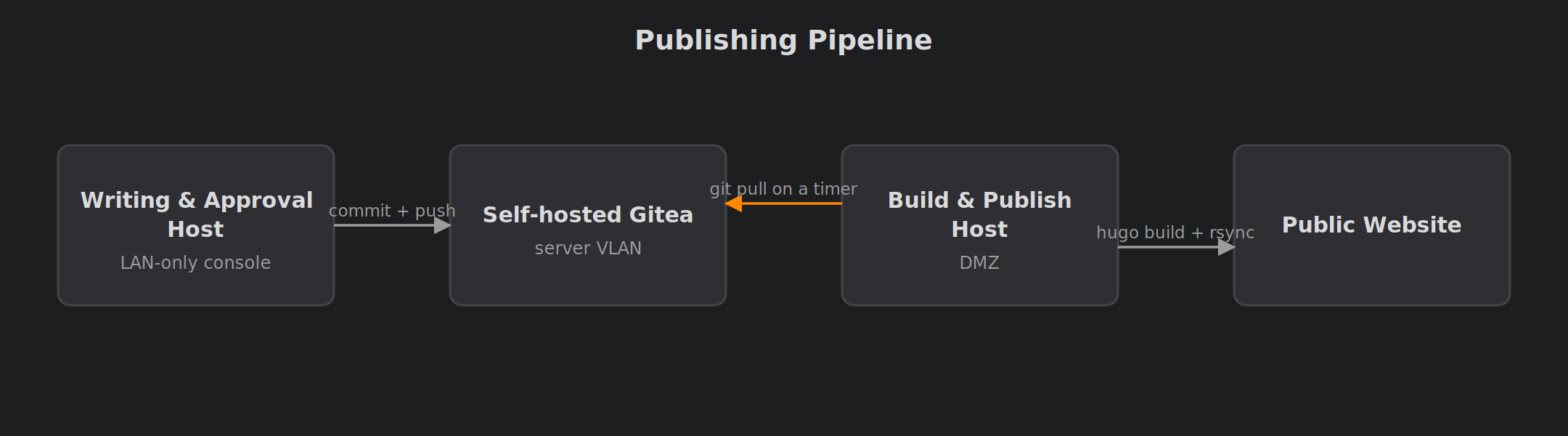
There are three roles in the publishing path:
- A writing and approval host: my home-lab console on the internal network, where drafts are checked, previewed and approved
- A Gitea server on the internal server VLAN, which holds the site repository
- A build-and-publish host in the DMZ, which pulls from Gitea, runs Hugo and serves the result
(LAN-only console)"] GIT["Self-hosted Gitea
(server VLAN)"] WEB["Build & publish host
(DMZ)"] PUB["Public website"] CON -- "commit + push" --> GIT WEB -- "git pull on a timer
(read-only deploy key)" --> GIT WEB -- "hugo build + rsync" --> PUB
The important part is the direction of the arrows. Every connection now starts on the inside or goes outward from the DMZ to fetch; nothing on the internal side connects into the DMZ.
A Short History: From hillpush to the Console
The pipeline started as a small script on my workstation called hillpush. Run from inside the site repository, it fetched and rebased, prompted for a commit message, pushed to Gitea, and then SSHed into the publish host to trigger an immediate build. The build host also ran the same publish script on a timer, as a fallback for plain git pushes.
It worked well for a long time, but it had two weaknesses. Publishing depended on one machine with the right SSH keys, and there was no review step: whatever I committed went straight to production.
hillpush is now retired. Writing and approval moved into my home-lab console, which commits approved posts to Gitea itself. The SSH trigger went with it, so the timer that used to be a fallback is now the whole publishing mechanism. A post goes live a few minutes after approval instead of instantly, which for a personal blog is no loss at all.
Security: The DMZ Host Only Pulls
Removing the SSH trigger was the biggest security improvement in this revision.
Before, my workstation held a key that could log in to the publish host. That meant there was a path from the internal network into the DMZ, and a firewall rule to allow it. Now there is none. The DMZ host’s only relationship with the internal network is an outbound pull from Gitea, using a read-only deploy key.
That gives a clean failure model:
- If the public-facing host were compromised, the attacker could read the site source, which is public anyway, but couldn’t push changes back into the repository.
- There are no credentials on the internal side that open a session on the DMZ host, so a compromised workstation can’t be used to reach it either.
A timer on the build host replaces the trigger. For example, a minimal systemd timer looks like this (the interval is illustrative):
| |
The Publish Script
On the publish host, a script owned by the web server’s user does the build. A minimal version looks like this:
| |
A few deliberate choices here:
- Hard reset, not merge. The clone on the server is disposable. Any local edit made there is thrown away on the next run, so the server can never drift from Git.
- Submodules. The theme is a Git submodule, so the build host has to update it too. I missed this at first and got builds with a stale theme.
--cleanDestinationDir. This one was a bug, and an earlier version of this post got it wrong. More on it below.rsync --delete. Files removed from the build output also disappear from the web root.- Runs as the web user. The build doesn’t need root, so it doesn’t get root.
The Deleted Pages That Wouldn’t Die
I originally ran plain hugo --minify and assumed rsync --delete would take care of removed pages. It didn’t. Hugo writes into its output folder but doesn’t clear out files it no longer generates. A page deleted from the repo stayed in public/, so as far as rsync was concerned it still existed, and it kept being served.
--cleanDestinationDir makes Hugo remove anything from the output folder that isn’t part of the current build. Only then does rsync --delete do what I thought it was doing all along.
Preview and Approval
The original pipeline had no staging: main was production. That’s no longer true. Before a draft is committed, the console:
- Runs a security check on the content, looking for things like internal names, addresses and anything that looks like a credential
- Builds a preview with exactly the live build settings
- Shows a diff against what’s currently published
- Waits for a manual approval, and only then commits
“Exactly the live build settings” turned out to matter more than I expected. Same flags, same Hugo version, and same time zone. My first preview builds ran in a different time zone from the build host, and date handling differed between the two: a post could look fine in the preview and come out with a different date, or be treated differently around publication time, on the live site. Pinning the time zone in the site config, rather than relying on the host’s environment, fixed that. For example:
| |
The preview then uses the same command as the publish script, just with a different destination:
| |
The console also checks that its Hugo version matches the build host’s (hugo version reporting the same vX.Y.Z on both) before it trusts a preview.
Comments Use the Same Git Server
The site’s per-post comments are stored as Gitea issues, through a small bridge service that holds the API token server-side, so the browser never sees a credential. I’ve written that up separately in Self-Hosted Hugo Comments with a Private Gitea.
This matters here because it changed what the Git server is. When it only held the site repo, it was a convenience: every clone was effectively a backup. Once comments lived in its issue tracker, it held data that existed nowhere else.
Rebuilding After Losing the Git Server
I deleted the original Gitea container by mistake. The site source survived, because other machines had full clones. The comments did not. Everything posted before the rebuild is gone.
Rebuilding Gitea itself was easy. Re-wiring everything that depended on it took longer:
- The repository owner changed. The new instance has a different owner path, so the remote URL on every clone had to be updated.
- The deploy key had to be re-registered. Deploy keys belong to a repository on a specific instance.
- API tokens were dead. The comments bridge failed with authentication errors until I issued a fresh, scoped token.
- Host keys changed. The publish host refused to pull because the Git server’s SSH host key was different.
Updating a clone’s remote is a one-liner, for example:
| |
Shortly after the rebuild I moved Gitea to HTTPS-only with a proper certificate. That broke the comments bridge a second time, because it was still talking plain HTTP. Gitea answers that with a fairly clear 400 error, once you know where to look.
Tradeoffs
Advantages
- No external CI service and no build runners to maintain
- Every deployment corresponds to a Git commit
- Nothing on the internal network connects into the DMZ; the public host only pulls, read-only
- Every post is security-checked, previewed with live settings and approved before it’s committed
Limitations
- Builds happen on the public-facing host, so Hugo has to be installed there and kept in step with the preview host
- Publishing waits for the next timer run rather than happening instantly
- The timer runs whether or not anything has changed. That’s cheap for a small site, but not elegant
- Because the Git server holds comment data, it’s backed up as a stateful service in its own right, not just covered by Git clones
A webhook from Gitea could replace the timer, but it would reopen exactly the inbound path into the DMZ that I just removed. For a personal site, pulling on a timer is the simpler and safer option.
Lessons Learned
- Know what’s actually stateful. A Git server that also stores issues is a database, not just a remote. Back it up like one.
- Write down every credential that’s tied to an instance. Tokens, deploy keys and host keys all have to be redone after a rebuild. A checklist turns hours of debugging into minutes.
- Check the SSH user before blaming the keys. My Gitea runs under a non-default system user. SSH looked completely broken until I noticed I was connecting as
git@out of habit. - Do fixes as the user that runs the job. I once fixed a host-key problem as root, which left the service account’s
known_hostsowned by root and broke the next publish. Usesudo -uwith the service account for anything touching its SSH config. rsync --deleteonly mirrors what’s in the build folder. If the build tool doesn’t clean its output, deleted pages live on. Use--cleanDestinationDir, and test by actually deleting a page.- A preview is only useful if it matches production. Same flags, same Hugo version, same time zone. The time zone was the one I’d never have guessed.
- Removing a convenience can remove an attack path. Dropping the SSH trigger cost me a few minutes of latency and left the DMZ with no inbound connections from inside.
- Make the server copy disposable. Hard-resetting to the remote on every build removed a whole category of “why is production different?” problems.
Comments