Overview
The page you’re reading came from a self-hosted Git server. It was rebuilt by a box in my DMZ and served from a web server I patch myself. My e-mail comes from the same home lab, and so do the TV guide, the wall dashboard in the hallway, and the brew-day temperature logs. The home lab started as a few separate projects. Over time those projects have grown into one suite.
This post is the “start here” page for that suite. It doesn’t go into any detail itself. It explains how the pieces fit together, then gives you a quick tour of every project write-up on the site, grouped by theme, so you can jump to whatever interests you.
As in the individual posts, I describe machines by their role rather than their name, and I leave out internal addresses and layout.
The Idea of a Suite
For a long time my lab was a set of separate things. A cluster ran guests, a mail server handled mail, and a folder of shell scripts sat on my desktop. Each one worked, but my notes, the procedures and the public write-ups all slowly drifted apart.
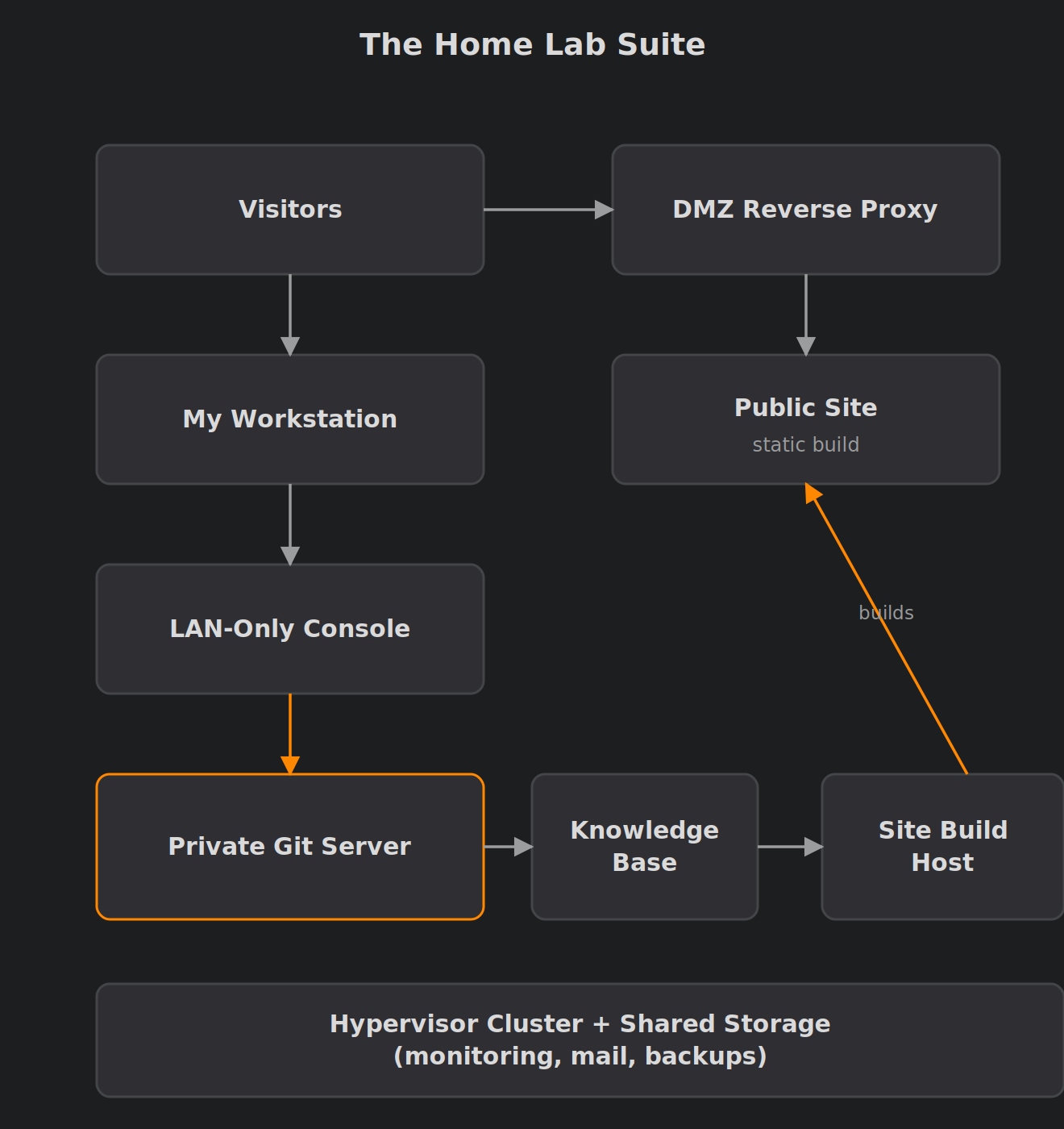
These days I think of three front ends with a shared look, all sitting on the same infrastructure:
- The public site. That’s this blog. It’s a static Hugo site built from Git, with self-hosted comments and analytics.
- A private knowledge base. Internal documentation lives as Markdown in a private Git repo. It syncs automatically into a wiki that I can read and search. Public posts are written from it only through a manual, reviewed step.
- A small LAN-only web console. This is where the jobs I used to run by hand now live: approving posts, triggering maintenance and checking status. It has passkey sign-in and a fixed list of actions that I’ve reviewed.
Underneath those three sit a hypervisor cluster, shared storage, monitoring, certificates, mail and backups. The three front ends share a visual style. They also share the rule that Git is the source of truth, so a lost server can be rebuilt instead of mourned.
(static build)"] WS["My workstation"] --> CON["LAN-only web console"] CON --> GIT["Private Git server"] GIT --> KB["Knowledge base"] GIT --> BUILD["Site build host"] BUILD --> SITE subgraph INFRA["Hypervisor cluster + shared storage"] GIT KB CON MON["Monitoring"] MAIL["Mail server"] end INFRA --> BK["Backups"]
Infrastructure and Backups
Everything else runs on this layer, so it’s a good place to start if you like hardware and storage.
The cluster. Three second-hand mini PCs, one NIC each, shared iSCSI storage and HA for the services I’d notice from outside the house. The post covers the VLAN simplification and the backup redesign, plus a few hard lessons about watchdogs and slow disk moves. Read: 3-Node Proxmox Cluster on EliteDesk Minis
Monitoring. Logs and metrics from every container end up in one place. I switched from pull-based collection to push-based, and the dashboards are now generated from code instead of hand-built. Read: Homelab Monitoring with Grafana, Loki, Prometheus and Alloy
Workstation backups. Plain rsync over SSH turns out to need a lot of care before you can rely on it. That means timeouts, scheduling, and a report e-mail that tells you when something has quietly stopped working. Read: Building a Resilient Linux Workstation Backup System with rsync
Network and Security
These posts cover keeping things private, encrypted and boring, in the good sense.
Certificates everywhere. A dozen hand-made certbot setups became one central ACME client. It uses DNS validation and pushes each certificate out to its host, so internal services get real TLS without being exposed. Read: Automating Let’s Encrypt for Internal Hosts with DNS-01 and SSH Push
Hardening the DMZ. Tightening SSH on the public web server showed me that my deploy process depended on things I’d forgotten about. In the end, the best hardening step was removing a door completely. Read: Locking Down SSH in a DMZ for Hugo Deployments
The web console. My desktop scripts became a small LAN-only console with passkeys and a fixed list of actions. An AI assistant drafts pages there, but a security gate checks them before I approve anything. Read: A LAN-Only Web Console for My Home Lab
Mail and Identity
Self-hosted e-mail has a scary reputation. These posts show what it actually takes.
Running my own mail server. I moved my domain’s mail from a hosted provider back to Postfix and Dovecot at home. The post covers the DNS, deliverability and design choices, and what surprised me along the way. Read: Self-Hosted Email: Running My Own Mail Server Again
A smart-host relay. This is the older pattern: a LAN relay for scripts and alerts that forwards through a provider. My own mail server has since replaced it, but it’s still a useful recipe if you send mail through a provider. Read: Mail Relay at Home: Postfix Smart Host
An LDAP address book. One private contact directory over LDAPS, shared by the terminal and graphical mail clients, so I’m no longer keeping three address books in sync. Read: Building a Private LDAP Address Book with OpenLDAP
Mutt, tidied up. A modular Mutt configuration that switches accounts and colour themes with a keystroke. It’s for anyone who still likes reading mail in a terminal. Read: A Clean, Modular Mutt Setup with Account and Theme Switching
Publishing This Site
This is how the blog gets from a draft to your browser without any third-party platform involved.
The deploy pipeline. Posts are previewed and approved in the console, then committed to Git. A build host in the DMZ pulls them read-only and rebuilds the site. The post includes what I learned rebuilding all of this after losing the Git server. Read: Automating Hugo Deployments (Git-Based Workflow)
Comments without a SaaS. The comment box at the bottom of this page is backed by a private Git server, with a proxy carefully placed in front of it. Read: Self-Hosted Hugo Comments with Private Gitea
Privacy-friendly analytics. Matomo stays on an internal server, and the DMZ proxy carries only the tracking traffic. The tricky part was keeping the real visitor IP and geolocation intact along the way. Read: Self-Hosted Matomo Behind a Reverse Proxy
The knowledge base behind it all. Markdown in Git is the source of truth. Automated jobs keep the wiki in sync, and public posts like this one are written from it only through a manual review. Read: A Git-Backed Home Lab Knowledge Base with BookStack
Media and Home Automation
This is the part of the lab the rest of the household actually notices.
Home Assistant. The add-ons, integrations and dashboards I run, and how Home Assistant ties into the cluster and the certificate automation. Most of the gadgets below depend on it. Read: Home Assistant
Live TV in Jellyfin. NextPVR and Jellyfin share one container to provide live TV. It’s also a cautionary tale about how one config line broke every channel behind a generic transcoder error. Read: Live TV in Jellyfin with NextPVR
The wall dashboard. A MagicMirror² that has run on three generations of hardware. It shows weather, sensors, music, news and live webcams, and now runs in kiosk mode. Read: MagicMirror² Wall Dashboard: From Pi Zero to Odroid to Brix
Brewing
Yes, the home lab brews beer. Sort of.
The brewery. My home brewing setup and the automation stack around it. This is where the hobbies overlap the most. Read: Rolling Hills Brewery
The brewing log. A running record of my IPA batches and hop additions, kept partly for me and partly for anyone chasing a similar recipe. Read: Home Brewing Record – Rolling Hills Brewery
Where to Start
If you’re not sure where to dive in, here are three suggestions:
- You’re planning your own lab. Start with the cluster post at the top of Infrastructure and Backups, then read the monitoring post next to it. Those two shaped every later decision.
- You run a blog and want to own it outright. Read the Publishing This Site section in order: the pipeline, then comments, then analytics, then the knowledge base. Together they show the complete path from note to published page.
- You just want something fun for the weekend. Go to Media and Home Automation. The wall dashboard is a very satisfying build, and it doesn’t need a server rack.
Lessons Learned
Some themes keep turning up across nearly every post:
- Git as the source of truth turned a lost server from a disaster into an afternoon’s rebuild.
- Fewer doors, not stronger locks. Removing inbound access usually beat hardening it.
- Write it down once, in one place. The knowledge base exists because my notes kept drifting away from reality.
- Boring is a feature. The best parts of the lab are the ones I forget are there.
I keep adding to the lab, and I’ll keep this page up to date as new write-ups go live. If one of these posts helps you, or you think I’ve done something the hard way, let me know in the comments.
Comments